Showing posts with label administration. Show all posts

Wednesday, 3 January 2018

Ultra Cheap ZFS Array

Make your own ZFS array (mirrored) with USB Flash drives, for cheap!


Since this... interesting post of mine... has only about 10 views, and my tech items usually get a few hundred, I figure somewhere along the lines it got trampled by my silly New Years post....

Friday, 31 March 2017

Linux Server Admin : Bash Kill Processes By Common Name

On my Linux server I've recently wanted to go through and kill a bunch of application instances in one go, this is a server where students have been connecting and running carious programs under python, therefore I want to remove from my processes anything called "python".

We can see these in our bash shell with the command:

sudo ps -aux | grep python

To remove all these programs I create the following bash shell script:

k = 0
for i in $(ps -aux | grep python)
do
  k=`expr $k + 1`
  kill -9 $i  
done
logger -s "Closed $k Python Instances"

Notice k=`exp... this is NOT a single quote (apostrophe) it is the "smart quote" on a UK English keyboard this is the key to the left of the number 1.  It is used to substitute the command into place, so the value counted in K becomes the result of the expression "$k + 1", i.e. K+1.  More about Command Substitution in Bash here.

The call to logger -s places the message both on screen and in syslog for me to review later.

This simply loops through all the applications resident and kills them off, I've saved this as a "sh" file, added executable rights with "sudo chmod +x ./killpythons.sh" and I created this to run as a cron job everyday at 3am (a pretty safe time, unless I have some students burning the candle at both ends).

That's everything about the bash script, for those of you wondering about the students, they're those folks following my learning examples from my book, which you can buy here.


Wednesday, 25 January 2017

Administrator : Friend Still in Failure

Can you  hear a banging noise?... No... Are you sure?... I can.. Oh no wait, that's my head slamming into the desk.

A few weeks ago I posted about a friend for whom I uncovered a security loop hole for, the python script being run as root...

Well, it seems the same person, on their main "enterprise windows server" has been similarly hacked by the same chap, but the trick was this one.... http://megalomaniacbore.blogspot.co.uk/2016/04/windoze-security-loop-hole.html

Yes, a loophole I had mentioned and blogged about.

The loophole was exposed by a C# program the chap had written for them, I'm not sure what it did, but it was run as a service, and could spawn other programs under the same user, he'd written it so that it ran any program in a sub-folder then before he'd left he made it run a VLC remote desktop and another small program which opened a "Save As" dialog.

It opened this way way off screen, at something like location 20000 x 4500.  So the only indication it was there was a small twitch to the task bar, but he used the mouse to the browse the dialogue to the command executable and opened himself  a prompt as the administrator user.

I didn't spot this, I didn't even look at this machine for my mate, instead over the weekend I had a machine at home I was using as a network routing test, and I asked for some space on a remote server with a fat pipe to do a slow-loris type attack on my software.

I set up my end and set up their end, expecting to get something like 200mb/sec attacking me and swamping my little 64K buffer (I could then scale and tune my software to defeat this kind of attack, was the plan).

What I noticed was that I only got around 8mb/sec coming to me, so with my remote session I did a little digging and saw the disk activity was around 34%, with no-one in the office?!??!

The developer they'd let go was running a torrent service from the machine!  He was downloading and seeding several video streams of dubious merit and origin.

I didn't change anything, I just called my friend and explained... And I left it there, I'm yet to hear what was going on.

However, I think my friend will be having a word with the IT Admin he's had in place for nearing a month for not spotting that out of hours and weekends this persistent idiot is still infiltrating and using their systems as his own repository.

I've told them three times now to unplug everything and to put a secure router between their switch and the outside world, something brand new and only set up by them, pfSense perhaps, but they've not listened.

Monday, 2 January 2017

Administrator : Show Network Abuse...

As a network boffin it's always very difficult to express to every possible audience quite how busy & complex a job you have, not least in today's environment where you have wired and wireless connectivity from every imaginable device, uPnP, SSDP, ARP, netbios, Active Directory, DHCP, DNS, UDP, TCP... It's a plethora of fields you have to take collectively as knocking on the proverbial door to your network adapter.

Recently we've employed the excellent Solarwinds tools as a method of network node and inter-connectivity debugging, and as much as I enjoy presenting the truly informative flow-charts and information they don't show quite how huge the amount of data and number of packets flying around is.... I therefore set about visualising and displaying just such a situation to an audience...

A Ubuntu VM, with the I3 desktop and a little time later.....

cd~
git clone https://github.com/the-tcpdump-group/libpcap.git
cd libpcap
./configure
make -j4
sudo make install

Then...

cd ~
git clone https://github.com/the-tcpdump-group/tcpdump.git
cd tcpdump
./configure
make -j4
sudo make install

And now, I could... "tcpdump"... to just spew everything into a terminal window...

Open another terminal window and I could "tcpdump | grep 'facebook'" and see how much time people were flying off to facebook, the beauty and simplicity of the i3 desktop along with the raw output of tcpdump soon conveyed far more stark a message from a monitor on my desk than any e-mail could or diagram could communicate.

Just the TCP packet headers were enough, without prying into what was being sent over a company network, in company time to facebook... and ebay... and whatever else... 

Using egrep I could dig even further into the headers and get very specific, laying out the desktop with i3 just further emphasising the flow and pattern of usage... Anonymize it and I'd have a decent techy screen-saver too!

Saturday, 24 December 2016

Administrator : Blocking Spammers & Hackers (Basics)

To see whom has been trying to connect to your Debian (or Ubuntu) server, use:

cat /var/log/auth.log | grep "Failed"

This will list out the failed attempts, then add the successful with:

cat /var/log/auth.log | grep "session opened" | grep "LOGIN"

You can note the IP addresses for the unwanted attempts and block them with iptables, like this:

sudo iptables -I INPUT -s AAA.BBB.CCC.DDD -p tcp --dport ZZZ -j REJECT

Where the IP to block is "AAA.BBB.CCC.DDD" and the port is "ZZZ" as a number, so to block 192.168.0.1 on port 7000 you would do:

sudo iptables -I INPUT -s 192.168.0.1 -p tcp --dport 7000 -j REJECT

Instead of REJECT you can use DROP, and in place of tcp you can use udp and icmp protocols.

To block a whole subnet range I just do this:

sudo iptables -A INPUT -s AAA.BBB.CCC.000/AAA.BBB.CCC.255 -p tcp --dport ZZZ -j DROP

This makes all addresses in the range not respond, the range could have been 192.168.0.0/192.168.0.255, or you could block higher up the range like this 192.168.0.0/192.160.255.255, the first address range blocks just the last section subnet mask, the second blocks the last two sections of the subnet mask!

You can view the iptables in use with:

sudo iptables -L


Why Does This Exist?
Its not often I have to actually turn a server towards the outside world, my personal servers usually sit on my LAN and never route to the internet, like-wise the items I provision in the office are for internal use...

Yesterday however, I had the pleasure of being told to make a service available to the outside world...

No big deal, it's Apache2 on a Ubuntu host, set up done... And I only opened port 80 then left it... All was fine...

It has run for six hours... six... On a brand new acquired IP address, no-one but the recipient at the far end knows about the server being there, it has no DNS entry, it has no other services, just port 80 and ssh open...

Yes, I have had hacker, poking, security breach attempts from China, Vietnam, the British Virgin Islands, Canada, the Netherlands and Russia...

The mind boggles at quite how much hacking and infiltration is going on out there...

I've been checking the mainly ssh breach attempts with the command:

cat /var/log/auth.log | grep "Failed"

I run this to a file and then have a python script to log the IP addresses into a table for me, and I can then just block them individually or as a subnet range, though iptables.

I also check for successful logins just in case with:

cat /var/log/auth.log | grep "session opened" | grep "LOGIN"

I wonder however whether a python script to manage all this for me might be in order... Hmmm, project time!

Tuesday, 15 November 2016

Administrator: ZFS Mirror Setup & NFS Share

I'm going to explain how to use some simple (VMWare emulated) hardware to set up a ZFS Mirror.  I'm picking a mirror, so they have 100% duplicates of the data.

I've set up the VM with a 4 core processor and 4GB of RAM, because the potential host for this test setup is a Core 2 Quad (2.4Ghz) with 4GB of DDR2 RAM, and it's perfectly able to run this system quite quickly.

The first storage disk I've added is a single 20GB drive, this is the drive we install Ubuntu Server 16.04 onto.


Then I've returned to add three new virtual disks each of 20GB.  These are where our data will reside, lets boot into the system, and install zfs... Our username is "zfs-admin", and we just need to update the system:

sudo apt-get update
sudo apt-get install zfs

Once complete, we can check the status of any pools, and should see nothing... "No pools available"


We can now check which disks we have has hardware in the system (I already know my system installed on /dev/sda).

sudo lshw -C disk


I can see "/dev/sdb", "/dev/sdc" and "/dev/sdd", and I can confirm these are my 20GB disks (showing as 21GB in the screen shot).

The file they have needs about 5GB of space, so our 20GB drives are overkill, but they've just had a data failure, as a consequence they're paranoid, so they now want to mirror their data to make sure they have solid copies of everything rather then waiting on a daily back up...

sudo zpool create -f Tank /dev/sdb

This creates the storage pool on the first disk... And we can see this mounted into the Linux system already!


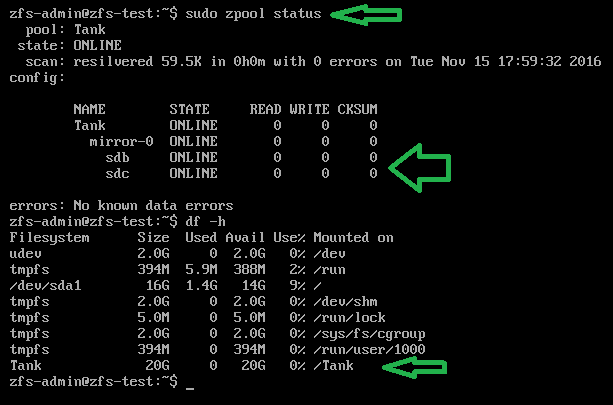
sudo zpool status
df -h

Next we add our mirror disk, so we have a copy of the pool across two disks... Not as fast as raidz but I'm going with it because if I say "raid" there's going to be "Raid-5", "Raid-6" kind of queries and I'm not going to jump through hoops for these guys, unless they pay me of course (hint hint)!


That's "sudo zpool attach -f Tank /dev/sdb /dev/sdc", which is going to mirror the one disk to the other... As the disks are empty this re-striping of the data is nearly instant, so you don't have to worry about time...

Checking the status and the disks now...


We can see that the pool has not changed size, it's still only 20GB, but we can see /dev/sdb and /dev/sdc are mirrored in the zfs status!

Finally I add their third disk to the mirror, so they have two disks mirroring the pool, which they can detach one from and go take home tonight, leaving two at work... It's a messy solution, but I'm aiming to give them peace of mind.


To detach a drive from the pool, they can do this:

sudo zpool Tank /dev/sdc

And take that disk out and home, in the morning they can add it again and see all the current data get put onto the drive.

So, physical stuff aside they now need nfs to share the "/Tank" mount over the network...

sudo apt-get update
sudo apt-get install nfs-common nfs-kernel-server
sudo nano /etc/exports

And we add the line:

/Tank 150.0.8.255 (rw,no_root_squash,async)


Where the IP address range there is the start of your IP, at home for me this would be 192.168.0.*.

Then you restart nfs with "sudo /etc/init.d/nfs-kernel-server restart", or reboot the machine...


From a remote machine you can now check and use the mount:


Why does this exist?
I think I just won a bet, a friend of mine (hello Marcus) about 10 years ago, I helped him set up a series of cron scripts to perform a dump of a series of folders as a tar.gz file from his main development server to a mounted share on a desktop class machine in his office.

He has just called me in a little bit of a flap, because that development server has gone down, their support had lapsed for it and he can't seem to get any hardware in to replace the machine for a fair while.

All his developers are sat with their hands on their hips asking for disk space, and he says "we have no suitable hardware for this"...

He of course does, the back up machine running the cron jobs is a (for the time) fairly decent Core 2 Quad 6600 (2.4Ghz) with 4GB of RAM.  Its running Ubuntu Server (16.04 as he's kept things up to date!)...

Anyway, he has a stack of old 80GB drives on his desk, he doesn't 100% trust them, but the file they have is only going to expand to around 63GB... So he can expand it onto one of them, the problem is he wants to mirror it actively...

Convincing him this Core 2 Quad can do the job is hard, so with him on the phone I ask him to get three of these 80GB drives, they're already wiped, and go to the server... Open the case, and let me ssh into it.

I get connected, and the above post is the result, though I asked him to install just one drive (which came up as /dev/sdg) and then I set that up as the zpool, then I asked him to physically power off and insert the next disk, where I then connected again and added it as a mirror.

In the end he has 5 actual disks, of dubious quality, mirroring this data, he's able to expand the tar.gz back up onto the pool and it's all visible with his developers again.

This took about 15 minutes... It in fact took longer to write this blog post as I created the VM to show you all!

Friday, 28 October 2016

Administrator : Using Python to Serve Files (HTTP)

The second in my mini-series of how to share storage between machines, easily, we're going to look at using Python as a Simple HTTP Server...

Linux
On Linux, with at least Python version 2.15.x (use "python --version" to check) you can simply run:

python -m SimpleHTTPServer

And the current folder will be served up on the primary ethernet controller on port 8080.

This is extremely useful to let some remote machine pull files quickly off of a system, and it's a very good technique to remember when you're developing and deploying, because you can just host your "/bin/debug" or "/bin/release" directory to the remote system, and when your builds complete that remote side can pull the new files or images over.

To do the fulling on Linux, I prefer to use wget, so lets assume the above folder is "/home/xelous/share" inside it is a file: "hello.txt", and the IP is 123.0.0.1, this is the wget from the remote machine:

wget http://123.0.0.1:8080/hello.txt

And voila, the file is whisked as a HTTP download across to the remote machine's current folder.

You can write scripts to pull lots of files over and then do builds, use a makefile and you can do builds from your code quickly as you carry on working, this is very useful in my set up as I have an 8 core laptop I can use to kick builds off on, whilst my local workstation can carry on doing another build.  When you're producing ARM kernel builds for two different platforms at the same time molding this simple server and wget to your whim streamlines your development speed so so much!

Windows
On windows you have to have a command prompt with the path to python set, lets assume our python is installed in "C:\Python":

PATH=%PATH%;C:\Python

Then start the server from the "web" folder:

cd \web
python -m http.server 8080

This does exactly the same as the linux version, except now we're hosted on Windows, and sharing the "C:\Web" folder on our server.

Browser
You can browse straight to both of these servers and just see all the files & folders too, simply browse to: http://123.0.0.1:8080/

Why does this exist?
I had a Windows machine which was on a "secure" network, and on that machine I needed to pull a lot of files over to a Linux workstation, I had no rights to create a network share on the Windows machine, and I didn't want to copy everything off onto USB or over the network; because I'd have been creating ghostly copies of all the files on those remote and movable storage intermediaries.

So for security and integrity I wanted to get the files as straight from A to B as possible.

The Windows machine had Python installed, so opening a command prompt, I found the python exe in "/users/myself/AppData/Local/Programs/Python", so set the Path as above, then  moved to the root of the system and started the server.

On the Linux machine I had a simple Python script which called the server "index.html", which was just the file & folder list and then this python script crawled the downloaded index and called "wget" on each file, or "mkdir" for every folder... And I re-cursed down the tree...

My next post will be that very script... Because I am nice like that!

Security Lesson
To any system administrators out there... This is a loop hole on ALL machines running python, take a look if you need to stop this happening!

Thursday, 27 October 2016

Administrator : Linux Network File System (NFS) Mounted Drives

Over the next few days I'm planning to bring you at least three videos about sharing files between different systems, specifically Windows and Linux... Today the easiest (at least for me) Linux to Linux sharing.

For this you will need SSH access and a user account on the remote system, and sudo (root) rights to both machines.  I'm running Ubuntu machines here, both for the client and the server, which variant (32/64) makes no difference.

The Server
sudo apt-get update
sudo apt-get install nfs-common nfs-kernel-server

We need the nfs-kernel-server here, and it will run as a service, once it's all installed we need to make a folder, I create them like this, making it owned by myself:

sudo mkdir /media/xelous
sudo chown xelous /media/xelous

Then I edit:

sudo nano /etc/exports

And I add to it:

/media/xelous     150.0.8.*(rw,no_root_squash,async)

This is the local folder we're mounting, and we're making it available to ALL the machines on the "150.0.8.1 to 150.0.8.255" range of IP addresses.

Saving this file, I then need to restart the whole machine, or just the service:

sudo /etc/init.d/nfs-kernel-server restart

You can then run:

showmount -e

To see the local mount you've just created, if you have an issue, and it doesn't show up, check the above again... because it does work, honest.... The most common problem is permissions on the folder you've created, sometimes on systems you are not the administrator on, it's best to share a folder from your /home directory.

The Client
The client is a simpler installation:

sudo apt-get update
sudo apt-get install nfs-common

Then you can check the remote mount, lets assume the server is on IP 150.0.8.40:

showmount -e 150.0.8.40

You should see the remote mount you created on the remote machine:

Lets create a folder locally, into which we'll mount the remote folder:

sudo mkdir -p /media/remote
sudo chown xelous /media/remote

Now, I happen to be the user "xelous" on both machines, but change your username for the local or remote machines... Mine is not best practice here, as they just have different passwords....

To mount the remote folder locally:

sudo mount 150.0.8.40:/media/xelous /media/remote

So, this is mounting the remote to the local, on the local machine I can then just hop into that folder and work, knowing all the files are trickling out over the network and into that remote machine.

This is very useful if you're going to run a thin client system, or are working on a machine with no, or read-only, local storage.

Why does this exist?
The driver behind this was my main development machine running out of disk space, and my not being allowed to install a new drive... yes, go figure (don't worry, I have asked the fair fellows of IT for access to my BIOS again - Yes, I'm still on a machine with a BIOS not UEFI, don't laugh).

So, with my workstation critically low on disk space, where was I going to put everything?... Well, on another Linux machine I have on the network of course, a big fat server with a slow CPU but oodles of storage.

Monday, 19 September 2016

Dell Poweredge 2950 Perc 5/i RAID Controller RAM Fixes

Over the last few weeks you will have seen that I've been tinkering with my Dell Poweredge servers, I asked Morten over at "My Playhouse", his suggestion was that the RAID controllers should appear in the POST screens even if they had no RAM.

Mine were not appearing, however, whilst investigating Mortens suggestion I did try a different stick of RAM in one of the controllers, and it showed up!... The Dell Perc 5/i controller output light blue/cyan coloured text when it had an issue.

So, I did a lot of reading, and it's few and far between about exactly what RAM the controller should take... As I had HP marked RAM in a Dell RAID controller, it was clear somewhere in it's life this stick I have had been swapped out.

I read that I needed EEC DDR2 PC3200-R 333mhz RAM for the controller, and specifically they needed to be Rx8 or Rx16 types.

Luckily I recently had a donation directly to the blog, so I invested that kind gift into two second-hand sticks of RAM for the RAID controller... Here is the result:


Monday, 12 September 2016

From Ubuntu Server to Debian...

I have had a few issues with Ubuntu's 16.04 release, notably on the server side, when removing the physical network wire on one connection, it would stay connected on another, reconnecting the wire it'd not come back up.

I tried this with wireless connections, with physical RJ45 and virtual devices in various guises, none of them worked right for my needs.

And loathed as I am to change to anything else, I'm currently in the middle of setting up and using a new purely Debian based server... Watch this space....


Thursday, 23 January 2014

Network Guru Fails at Monitoring his own Bandwidth

Do I come on here to bemoan the seeming incompetence of others a lot?... Because I have  just had an annoying 20 minutes talking to one of our "Network Experts", there's a server box running Ubuntu, its actually a virtual machine, and it was being blamed for crippling the network on the host machine - which has to run several other Windows Server 2008 Virtual Machines.

For some reason, this came across my desk, because someone has decided that though I can't advise the company on Linux server usage or adoption, I can be called into sort out the problems other fools create.

So, this server was running, the administrator chap is sat there with PuTTY connected to it and he's saying there's too much network traffic coming from the box.

Looking at the process list the machine is doing nothing, when I ask for one of its users to be made to use it, the CPU usage is a time flitter and then the usage is over, it appears to me the Virtual machine host is waking the VM, using it, and closing it.

The processes being used are simple webservices, so there should be no network traffic unless someone is using the server.

So, I ask.. "What's your idea that this machine is causing the issue?"  Very smugly the admin presented me with an A4 sheet with two graphs, one shows all his servers running with the Ubuntu machine present, and there's a whole load of traffic going on... The next is the same graph, with the Ubuntu box removed, and there's nearly no network traffic.

Then within PuTTY connected to the box he opens iptraf...


And he points to the statistics and declares, "See, this is running multiple kilobytes a second"...

Lets recap... "This machine is crippling our network usage on this box".... "using up kilobytes a second"... If any of you don't grasp how absurd this is please stop reading now, because the guy was clearly serious.  He's not that old, he's younger than me, surely he realises kilobytes a second on a modern gigbit backbone is nothing?  No, he seriously wants the ubuntu box silent.

So, what's causing this tiny trickle of bandwidth... Of course, he's connected to this machine with PuTTY...

"Close this window and take me to the machine in the server room"

In we go, and from the console plugged into the machine I run iptraf... look what we see now...


Yes, its zero...

When he is running his measures and checks he's connected over the network to the machine, he's been measuring his own bandwidth administrating the machine, and apparently the kilobytes per second that took were too much for him, I feel like this guy should be thrown from the building, not be earning far more than me in the "superior" position of "network guru god" which hs holds...

So knowing the machine is idle, I wonder what causes the bandwidth, so with the iptraf still running, I call up the user and ask him to get working again... and sure enough there's little trickles of bandwidth from the Ubuntu box, no spikes, no major blocks of transmission.  Hence after a few minutes I conclude the Ubuntu box though active, is only taking a tiny amount of the total bandwidth available to the machine, and so I start to look at the other machines...

And with just perfmon on the two Windows Server 2008 boxes with the user operating his end, I can see that the Windows boxes are spiking their network traffic, just with task manager you can see one box taking 20% the total available to it, and the other over 45%... This is a gigbit connection, and 20% of it is taken for maybe 30-50 seconds each minute and then goes quiet, then the 45% hog is there for maybe every 10 seconds of each minute.

They're scheduled tasks, as the users input items into their programs, the programs process and send out instructions, e-mails and update other databses.  The trickle of data I/O to the ubuntu machine is just such a feed, the Ubuntu box sucks/queries data from MS SQL Server on one of the machines and squirts it into MySQL where a very old (like 8 year old) unmaintained program written in C with MySQLConnector picks it up and uses sendmail to e-mail a load of people.  Such notifications take maybe 0.25 seconds and run every 5 minutes, the amount of data is small, and looking at the physical name of the Ubuntu box "e-mailer relay" I think it's safe to say its not using a lot of bandwidth and the other machines are to blame.

How I educate the "network expert"... This is my next task.