Showing posts with label ZFS. Show all posts

Friday, 26 November 2021

Naming a new Storage Server?

 Server names?  In practice I've always been in places or projects where folks are bad at naming things and I am as guilty as the next person in that realm.  I've been on projects naming releases for obscure lord of the rings characters, for characters in a random fantasy story the lead developer had written, for birds, biomes, planets and stars.... Generally these are very niche, if you know the reference you're fine, and it brings a little character to your server.

The trouble arises when a name becomes attached to the history of that thing, the worst I never had was a project with a release named Elrond, where the release itself was re-released, so we ended up with Elrond-2, 3 and 4, then Elrond4RC1 for an update to that successful update, it was just a minefield.

In servers, the worst I ever managed was a box called "Diomede", which would often fail because of bad (read that as cheap) hardware, so the name became inextricably linked to bad performance and issues, despite being a really nice Tomcat & IBM Websphere host with a near 99% up-rate, but that 1% let it down because EVERYONE worked on that one box.

At home at the moment I have:

* Wellington

* Napoleon

* Elba

* Ney

* Waterloo


I'm sure you can tell the reference, but I've had about three versions of "Waterloo", I've also had two versions of "Ney" and at least five "Napoleons".  The names are getting mixed up, as I leave a home project and come back I'll go look up my notes, pull up that machine storage only to realise "oh this was on the OLD version of that name" which was long whisked away into the ethereal world of my replication server or just lost to time.

As such, I want to have ONE big disk server, and I really want to make it nice and neat.   I've already retired all my older machines, like this one:


But I do now have TWO cases of this specification, with the many internal drive bays:


In one of these I have a low-power Core i3 T class CPU, I forget the exact spec, but it's a low-power chip (35W) just enough power to run storage backups IMO, so this is where I'm going to start my quest.

Spinning rust drives are the challenge, I have four 4TB drives just sat idle, plus a host of smaller 1TB drives lying around, these need sorting out, mounting, checking and I then need a strategy.

I'm very likely to go with ZFS creating a mirror across three 1TB for critical storage and then some striped storage across the 4TB drives.  I then want this to make files available across the network, both to my 10GBit and my 1Gbit LAN's.... That's going to require a bit of work to install the former, but the latter should be available out of the box.

This starts to completely retire my 4Gbit fiber channel interconnects too.

So what to name this first stepping stone?.... Comments below:

Elba
Helena

Since it's about storage, I think my theme of names points to one of the islands which hosted Napoleon in exile... but lets see what you guys come up with.


Saturday, 17 October 2020

Four Drives Enter, two Drives ... Well they're fine, read on

Very much like my prior post I've come to turn on the wall mounted server, which is no longer on a wall... only to find the ZFS pool is degraded.  Two drives are AWOL.

They are plugged in, the cables are checked and good, the power is good.... But for two to just vanish is a mystery, they're nice new WD Green SSD's.


And you can see the disks are added to my pool by ID, so it makes no difference which SATA port I plug them into.

I've got six SATA ports on this Motherboard, in three banks of two.  I wondered if the two other banks (as the boot and first mirror in the pool were in the first bank/pair) had gone bad, so many reboots later and checking, no it seems just these two drives are outta there.

I'm going to remove them and come back to this once I have a firm back up of the data.


Here they are.  So I bought these in June, they're marked March 2020.  My plan is, take the data off of the surviving drive in the pool, then sacrifice of of these two to the fdisk gods and see what it does.....  


There we are, that's one of the two in my SATA to USB caddy and... It's fine... Shows itself as very little use, it admittedly is a ZFS formatted drive, but the SMART information is all normal, so I'm thinking....

I'm thinking maybe the PSU on that wall mounted server is doing strange things.  Once moment, I'm going to try that hunch by removing the SATA power from the detected single drive and putting it in the other of these two I have laying here.

YES!... Right, so the disks are good, but the SATA power is on the wonk.  This is a horrid cheap PSU, so maybe time for a replacement.


Saturday, 10 October 2020

Twelve Drives Exit - Only Ten Drives Survive

 I've spent the morning doing a bunch of hard work, like using a surface compactor to lay a 60 meter gravel track... I was knackered come lunch, so I decided to have a play in the server world.

Now, some of you may know we're between properties at the moment, this means I had to take all my servers offline and move them.

However, I've been desperate to get the 32 core machine back online.

Booting up just now though and a couple of the drives had gone bad, like physically bad.  As such my ZFS pool was just a total write off, so I've decided to restore from my offline back up.  There's not actually that much data on that cluster, it was only running raid 2.... And with two disks dying in a simple move, I thought it better to go for raid3.


But remember folks, RAID is not a back up.  My important server is a triple mirror Zfs pool.  I can lose any 2 of the three drives over there, and they're brand new nice WD SSD's... plus the server is ONLY turned on for backups.

This serer is my scratch working/coding project server, on which I host my build slaves and nodes in network tests etc.

Wednesday, 3 January 2018

Ultra Cheap ZFS Array

Make your own ZFS array (mirrored) with USB Flash drives, for cheap!


Since this... interesting post of mine... has only about 10 views, and my tech items usually get a few hundred, I figure somewhere along the lines it got trampled by my silly New Years post....

Sunday, 31 December 2017

Using Flash Drives in ZFS Mirror

This post comes from an idea I had to allow me to easily carry a ZFS mirror away from a site and back again, we didn't need much space - only 5gb - but it had to be mirrored in triplicate, one copy to stay locally, one going into a fire safe on site and the third to be carried by the IT manager off-site each evening.

The trouble?  A near zero budget, so for a little over £45 we have a 14GB ZFS mirrored pool, across three 16 GB USB Flash drives and one three port USB 3.0 hub.

It was perfect for the task at hand, extremely portable, and cheap, I thought the same approach may help anyone trying to get to learn a little more about ZFS, a student or even someone using a laptop as a small office server - as the laptop literally has its own battery back-up system built in!

It's not the fastest solution, its in fact extremely slow, but as an entry step it's perfect.

See the full video below, throughout the commands I list were in use...


Commands:

Listing Disks by ID...

ls /dev/disk/by-id

Listing Disks to a file for use in a file script as you see me using...

ls /dev/disk/by-id -1 > disks.txt

------------------

To install ZFS on Debian/Ubuntu linux:

sudo apt-get install zfsutils-linux

------------------

To remove & purge ZFS from your system:

sudo apt-get purge zfsutils-linux

(and you will be left with "/etc/zfs/pool.cache" to remove or back up yourself).

------------------

Command to create the pool...

sudo zpool create <Name> mirror <DiskId1> <DiskId2> etc...

The name we had here was "tank", if you already have data on these disks you will need to add "-f" to force this change through.

------------------

Command to make a file executable - like our sh script:

sudo chmod +x <filename>

------------------

Zpool Commands:

sudo zpool status

sudo zpool import <name>

sudo zpool scrub <name>

sudo zpool clear <name>


You will want to "import" if you completely remove ZFS or move one of your sticks to a new machine etc, simply insert the disk and import the pool by name.

Scrub will be used whenever you return a disk to the pool, remember the point here is to allow you to replicate the data across the three sticks and be able to remove one or two to safe keeping, be that an overnight fire safe, or taking a physical copy with oneself.

Clear is used to remove any errors such as the Pool becoming locked out for writing - which it may if a drive, or all drives are removed - you simply clear the current problem with any pool.


Summary:  Remember this is NOT the optimum way to run ZFS, this is actually extremely slow, you are replicating each write over your USB, you can only cache so much in the RAM, but it is not a performance piece, this is about ensuring one replicates data for safe keeping, a small office or your dorm room server setup could be completely provided by a laptop in this manner, it has it's own battery backup, it is quite (if you get the right machine) and really this is a very cheap way to play with ZFS before you move onto other bigger hardware options.  Plus, I find the best way to learn about technology is to break it, even a little, and so constantly breaking down your pools by pulling USB sticks out of them is an excellent opener to recovering your pools.  Play about first, don't put anything critical on there until you're really happy with the results.

For an excellent post covering creating ZFS pools, cheak out programaster's post here: http://blog.programster.org/zfs-create-disk-pools

And for the official ZFS documentation you can check things out with oracle here: https://docs.oracle.com/cd/E26505_01/html/E37384/toc.html


Oh, and Happy New Year... I guess I made it to 100 posts this year...

Tuesday, 15 November 2016

Administrator: ZFS Mirror Setup & NFS Share

I'm going to explain how to use some simple (VMWare emulated) hardware to set up a ZFS Mirror.  I'm picking a mirror, so they have 100% duplicates of the data.

I've set up the VM with a 4 core processor and 4GB of RAM, because the potential host for this test setup is a Core 2 Quad (2.4Ghz) with 4GB of DDR2 RAM, and it's perfectly able to run this system quite quickly.

The first storage disk I've added is a single 20GB drive, this is the drive we install Ubuntu Server 16.04 onto.


Then I've returned to add three new virtual disks each of 20GB.  These are where our data will reside, lets boot into the system, and install zfs... Our username is "zfs-admin", and we just need to update the system:

sudo apt-get update
sudo apt-get install zfs

Once complete, we can check the status of any pools, and should see nothing... "No pools available"


We can now check which disks we have has hardware in the system (I already know my system installed on /dev/sda).

sudo lshw -C disk


I can see "/dev/sdb", "/dev/sdc" and "/dev/sdd", and I can confirm these are my 20GB disks (showing as 21GB in the screen shot).

The file they have needs about 5GB of space, so our 20GB drives are overkill, but they've just had a data failure, as a consequence they're paranoid, so they now want to mirror their data to make sure they have solid copies of everything rather then waiting on a daily back up...

sudo zpool create -f Tank /dev/sdb

This creates the storage pool on the first disk... And we can see this mounted into the Linux system already!


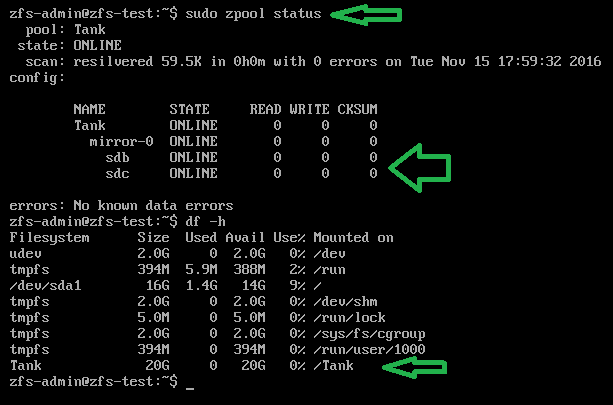
sudo zpool status
df -h

Next we add our mirror disk, so we have a copy of the pool across two disks... Not as fast as raidz but I'm going with it because if I say "raid" there's going to be "Raid-5", "Raid-6" kind of queries and I'm not going to jump through hoops for these guys, unless they pay me of course (hint hint)!


That's "sudo zpool attach -f Tank /dev/sdb /dev/sdc", which is going to mirror the one disk to the other... As the disks are empty this re-striping of the data is nearly instant, so you don't have to worry about time...

Checking the status and the disks now...


We can see that the pool has not changed size, it's still only 20GB, but we can see /dev/sdb and /dev/sdc are mirrored in the zfs status!

Finally I add their third disk to the mirror, so they have two disks mirroring the pool, which they can detach one from and go take home tonight, leaving two at work... It's a messy solution, but I'm aiming to give them peace of mind.


To detach a drive from the pool, they can do this:

sudo zpool Tank /dev/sdc

And take that disk out and home, in the morning they can add it again and see all the current data get put onto the drive.

So, physical stuff aside they now need nfs to share the "/Tank" mount over the network...

sudo apt-get update
sudo apt-get install nfs-common nfs-kernel-server
sudo nano /etc/exports

And we add the line:

/Tank 150.0.8.255 (rw,no_root_squash,async)


Where the IP address range there is the start of your IP, at home for me this would be 192.168.0.*.

Then you restart nfs with "sudo /etc/init.d/nfs-kernel-server restart", or reboot the machine...


From a remote machine you can now check and use the mount:


Why does this exist?
I think I just won a bet, a friend of mine (hello Marcus) about 10 years ago, I helped him set up a series of cron scripts to perform a dump of a series of folders as a tar.gz file from his main development server to a mounted share on a desktop class machine in his office.

He has just called me in a little bit of a flap, because that development server has gone down, their support had lapsed for it and he can't seem to get any hardware in to replace the machine for a fair while.

All his developers are sat with their hands on their hips asking for disk space, and he says "we have no suitable hardware for this"...

He of course does, the back up machine running the cron jobs is a (for the time) fairly decent Core 2 Quad 6600 (2.4Ghz) with 4GB of RAM.  Its running Ubuntu Server (16.04 as he's kept things up to date!)...

Anyway, he has a stack of old 80GB drives on his desk, he doesn't 100% trust them, but the file they have is only going to expand to around 63GB... So he can expand it onto one of them, the problem is he wants to mirror it actively...

Convincing him this Core 2 Quad can do the job is hard, so with him on the phone I ask him to get three of these 80GB drives, they're already wiped, and go to the server... Open the case, and let me ssh into it.

I get connected, and the above post is the result, though I asked him to install just one drive (which came up as /dev/sdg) and then I set that up as the zpool, then I asked him to physically power off and insert the next disk, where I then connected again and added it as a mirror.

In the end he has 5 actual disks, of dubious quality, mirroring this data, he's able to expand the tar.gz back up onto the pool and it's all visible with his developers again.

This took about 15 minutes... It in fact took longer to write this blog post as I created the VM to show you all!