Showing posts with label Dell. Show all posts

Tuesday, 28 February 2023

Will I ever Buy a Laptop Again?

Will I ever buy a laptop again?  This is a significant question, PC's themselves are going the way of becoming locked down, indeed UEFI was the first step on that road, requiring secure keys and other literal dongles is becoming quite common for the home PC Builder; or even small assembly shops.

Laptops are an even more confused space, building your own is sadly incredibly rare, but even rarer is being able to buy a laptop and it being upgradable.

Now, I accept laptops have soldered on components, they are an all in one solution for most vendors.  So it was four years ago when I specced up and bought my current laptop I had three requirements from it:

1. Upgradable Memory

2. Upgradable Drives/Storage

3. Changeable Battery

At that time I settled on the Lenovo E480, with an 8th Generation Intel Core i5 inside.

For point 1 I was able to buy it with 4GB of RAM (a single stick of DDR4) installed, saving me over £110 on buying an upgrade to 8GB direct.  I simply received it, opened it and installed a 16GB kit (pair of 8GB sticks) for £83; so I saved and had more memory.

For point 2, I was again able to get deliver with a single 500gb mechanical hard drive, and for merely £65 I was able to get a really nice M.2 nVME SSD and install that the moment it arrived.  I am still able to replace the standard 2.5" SSD SATA drive if I want.  And I was also able to install a 1TB MicroSD card for more cold storage of large files when on the move and disconnected from my file server.

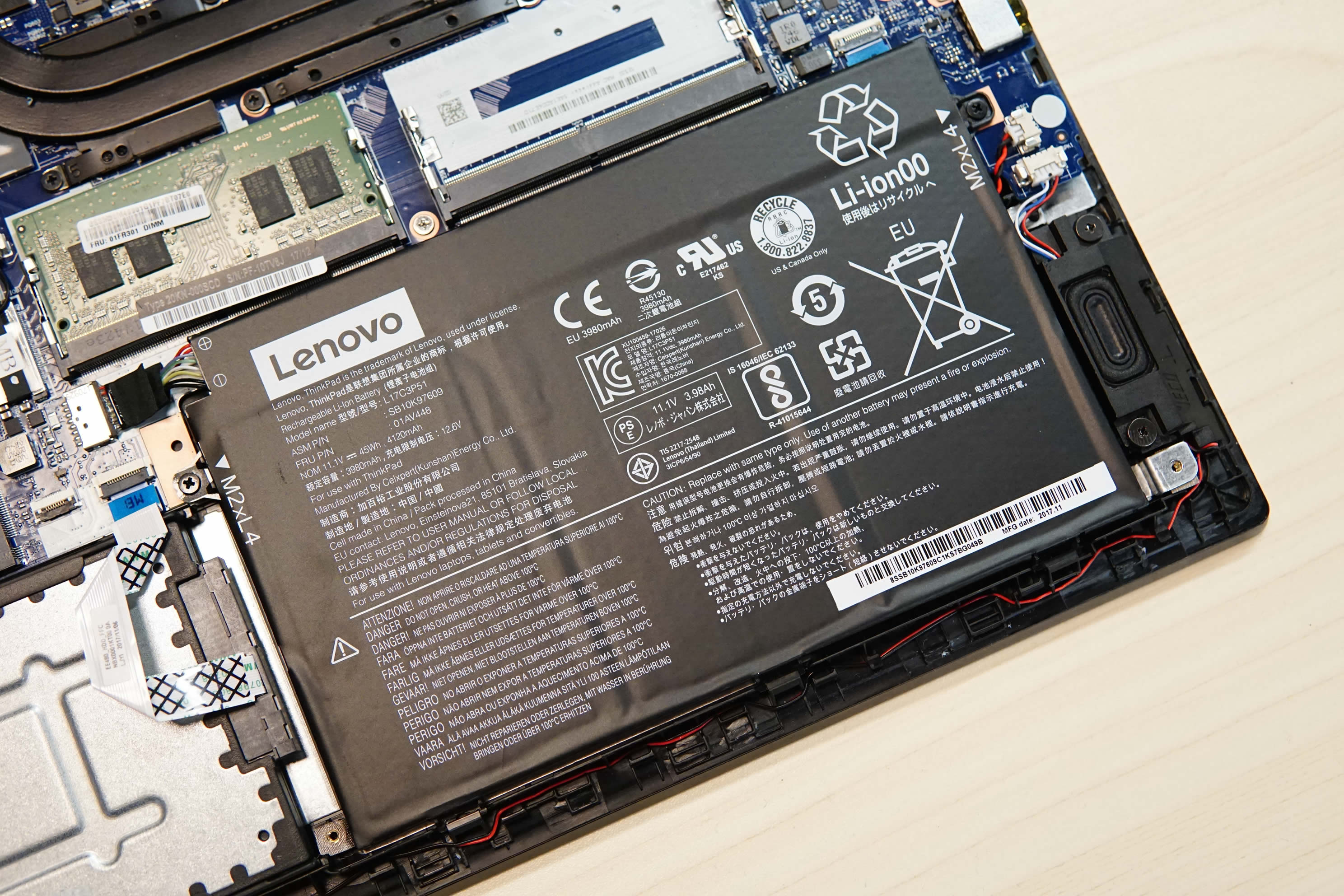
For point 3, being a Lenovo is a huge boon, there are a lot of resellers of their components and the battery is no exception, plus it's a battery just installed with a sticky pad and a single 4 pin connector, very simple to open the chassis and swap it out.  After four years mine is due a change, it has gone from around 9 hours on a full charge to only 4.

The machine is simple to work on, it's got lots of external ports, it can drive all the devices I want, the wfi, bluetooth and just quality of the Lenovo build is very nice.

So, what could possibly replace it?

I am coming up blank, I've been looking and looking, I do not want to support Apple, as much as I like the look of their hardware the total lack of any repair or upgrade paths in the M1/M2 space annoys me, their GPU is custom too, and I want to be working in open source wherever possible (read Linux).

Asus are similarly offering lots of options but so very many of them are locked down, there are RAM upgrades for some, but that's about all.  And crucially battery replacement is sketchy, it's hard to even find out what battery a unit offering has.

Very similar results in my search with Toshiba, Acer, Dell (including Alienware) and a custom builder here in the UK.

I did look briefly at modular options, such as the ones touted recently by Linus Sebastian, but getting them here in the UK is a massive pain in the rear.

So simply put will I ever buy a laptop again?  I don't know.

If I can find something meeting my three previous requirements and include adding an external GPU via USB-C to it, that maybe a selling point, but I'm really not willing to give up on the first three requirements I had.  They are the very definition of a laptop to me, you live with a locked down CPU and GPU, but at least you can expand the utility of the unit in other ways.  Except, vendors want to ship thinner, sealed, easy [for them] to support units with a limited [est 2 year] shelf life; after which you are cast to the winds.

As I understand it my Lenovo now being 4 years old, an 8th Gen Intel, makes it positively geriatric.


Want to read more about my quest for a laptop in 2018, why not read this one http://megalomaniacbore.blogspot.com/2018/12/deep-thought-about-new-laptop.html

Or even my laptop purchase from 2012, http://megalomaniacbore.blogspot.com/2012/01/custom-laptop-for-virtual-deeds.html

Wednesday, 26 December 2018

Deep Thought about a new Laptop

Its the day after THE day we wait for all year, yes today is Boxing Day and so yesterday was Christmas Day and I've had a fab day, thank you for asking!  Lots of food, a little drink, a fair amount of chocolate, a home made cheese cake to die for and about an hour in the freezing air enjoying the hot tub with all the bubbles on... Hands down has to rate as one of the Best Christmas Days for me ever... and I hope yours were all as good.

Now, I know you're all asking, why have I been so quite on the old blog and YouTube Channel?  Well, you know moving house completely threw things off, but also, in case you missed this news, I'm changing jobs.

Yes, after 14 years I'm leaving where I've been and I'm going to be doing something else.  Quite what I can't tell you very much about, probably for a fair while.  But what I can tell you is, I start the new role on the 2nd January, the team I have been assigned to is brand new and we travel to the US in mid-January to cement the bootstrapping of the new project.

And, this trip brings me to your sage pages.  You have all likely seen my post about my once great and mighty custom built Laptop and you may have also spotted my frustrations (admittedly eight years down the line) getting a replacement battery.

But it's Boxing day there are sales, there's a trip abroad breaching the surface waters, I am frustrated with the older machine (which I still love and am using right now)... Time for a new Laptop.

My requirements are a solid machine for programming, a good screen, RAM upgrade possible and definitely both SATA and M.2 SSD internally stored, I like lots of storage and I like to be able to replace it.  A replaceable battery, preferably as a pack is preferable and all of this as a known brand, so the battery would be on the market a fair while.

This means, GPU is not a concern really, it would be nice, but it's not a major concern, I've been down the gaming laptop whirlpool before it only ends in miserably depleted batteries and headaches replacing them.

The storage requirement I have also precludes eMMC or anything else which is fixed or soldered.

My first thought is for a quality machine, from a name, like Lenovo, Acer, Asus or Dell.


My very first laptop, way back in time was an IBM Thinkpad 360 a 486 SX 25Mhz, rocking 4MB of RAM and a 20MB hard drive running DOS6.22 and Windows 3.1.


I loved that machine, but lent it my brother when he started his business - and he had it stolen during a burglary never to be replaced... Grrr... But I loved the sturdy build on that machine, the keyboard was adorable, if I recall correctly it was a tiny form factor, like a 10" screen that did 640x480.  It travelled brilliantly in North Africa in the late 90's with work, and handled the Turbo Pascal and Turbo C programming I threw at it.  But due to the seeming prohibitive pricing and the changing of the keyboard I've never returned to the Thinkpad range, that thinking may change.
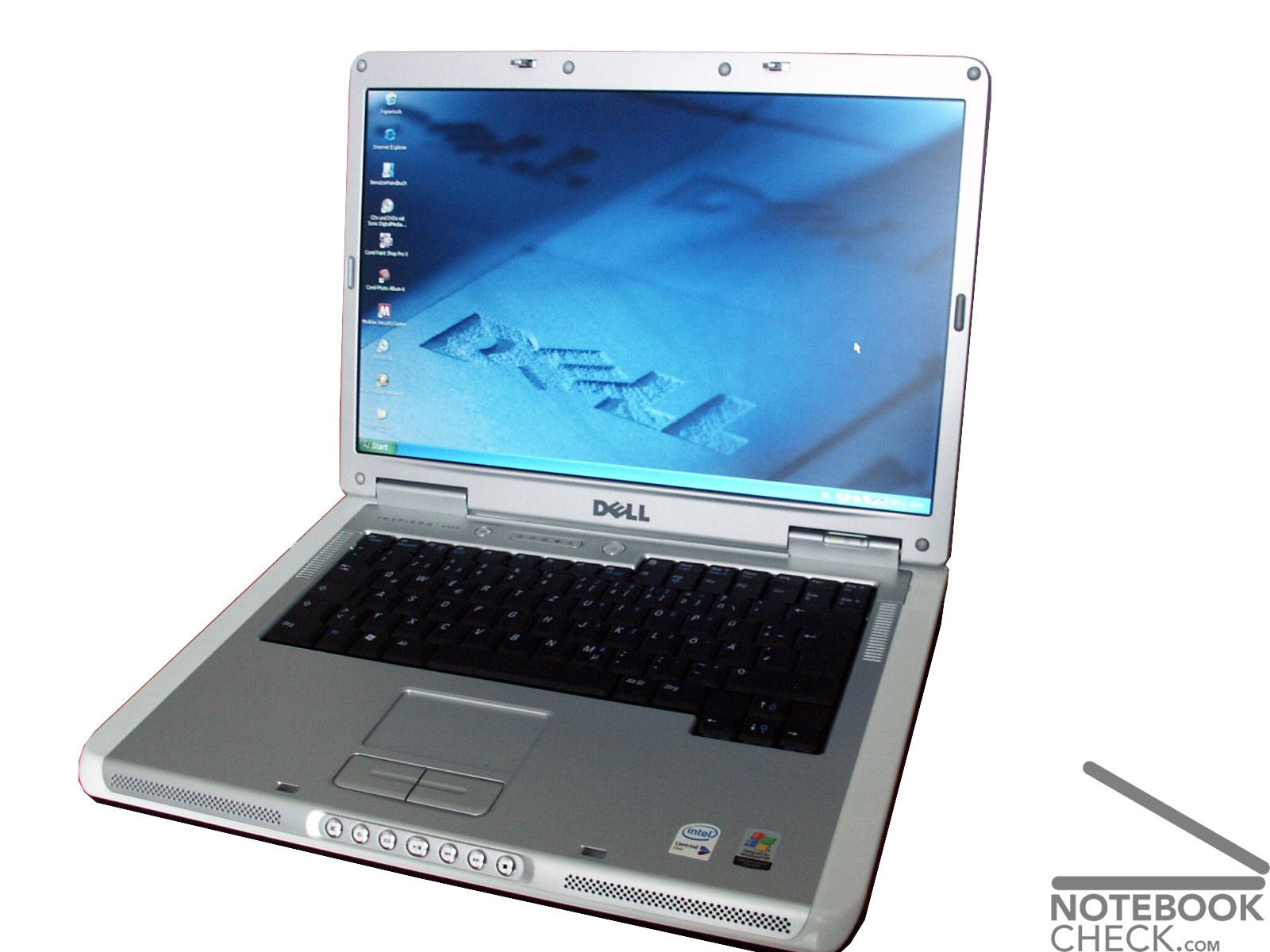

My second laptop is a veritable work horse Dell Inspiron 6400.  I say "is" because we still have this machine, it was purchased when I worked for "The Lordz Gaming Studio" as my workstation and a gaming machine... At the time, when on mains power, it ran beautifully (though I have a tale to tell when it was on battery)... And today we still have it, it's had more RAM and several larger hard drives over time, but we still use it daily as the general house laptop running Lubuntu (the wife still hasn't realized she was covertly switched to Linux about two years ago).


Wanting to get a brand name, I started where I left off and went to look at the Dell site, which  immediately splits Laptops by "Work" or "Home"... Clicking Work, foooooorget it, they immediately class you as requiring a Core i7 and price me out of the market, it's actually quite shoddy, in work I would say you need to pick the number of real cores to hyper threads, rather than limit the model number and so I know many of the Core i5 4 core 8 thread processors are being denied to me.  I therefore beat a hasty retreat to "Home".

The next thing I noticed is that all the Dell units seem to ship with 8GB of RAM.  Not unexpected 2019 is hurtling towards us at a rate of knots, but still it made me think about upgrade pathways, so set about finding tear down videos and images of inside these machines and was struck by how hard it is to pin down what you're going to be buying against what is on the screen, you can't tell, there's a skewing of the model number to contents within throughout their range, there's identifying model numbers which bear little to no relationship to the contents of the machine and worst of all many of the teardowns listed themselves as applicable to multiple models in the same lineage.  Telling me what?  Well, nothing firm, just that there's options beyond options but many of them look sort of fixes at birth for the boards within.  I saw one out of four units come up as having two RAM slots, many others had only one.  There was also no help trying to ask their online chat, they didn't know, they could only read what was listed with the product "it has 8GB of RAM"... yes, but can I put another one in?

However, I persevered and even started from a £679 machine to spec it up, however, I immediately saw that this whole line only had SSD storage a M.2 2280 no SATA storage option.  Another tear down video later and I confirmed this machine had only the M.2 slot, no internal SATA.  Which put it out of the running.  But it had given me an idea of a base processor I was going to aim for elsewhere, I was edging towards the Intel Core i5-8250U (6MB cache, up to 3.4Ghz).

This processor ticks many of my boxes, it seems to keep the base chasis of a machine at a low price, it has four real cores with hyper threading and a decent boost frequency.  Base frequency is lacking, but TDP is very desirable and it's battery life I'm concerned with.  And the units in built GPU (an Intel UHD 620) supports upto 4096x2304, and 4K maybe somewhere I go (I already have a 2K monitor as my daily driver).  It also supports up to 32GB of DDR4.

Similar processor counts, with slightly more cache, in the i7 range push prices up between £120 and £200, I could seriously live with this machine for 5 years and put that extra money into extra RAM and storage to add to a lower priced machine... So, the i5 is winning out and I'll carry on to other sites.

Now the Boxing day sales have kicked off, so I'm looking at the major high-street names and online retailers.  Like Amazon, AO, Ebuyer and CurrysPCWorld.

Whilst on Amazon and AO I saw a series of Acer and Lenovo units which were very low prices, like £150-£180.  The Lenovo IdeaPad 120 and HP Stream spring back into my mind, nice little units, too low-power for my linking and they're storage seems to be exclusively eMMC and tiny so not of use to me, but nice looking units, especially the Lenovo kit.

The only machine from this pass which really came to hand was the HP Pavillion kit, I saw a few others, but the Pavillion got really close.  It's a brand name, the hard drive is a 2.5" SATA and can be changed.  The RAM can also likely be upgrades with standard SODIMM modules.  However, hard data is hard to get and the price is still just shy of £700.  There's also no clear data on whether it can take both an SSD in M.2 form AND the SATA drive, there's a series of HP support images they themselves provide, but they're generic and clearly not specific to the unit I was looking at.  A minor annoyance is the charger also seems to be a custom pin type to HP, rather than a generic/universal USB/C type.

Without that firm information, with the higher price, I can't justify the risk of just not knowing, I need to know, so the HP now falls to the way-side.

A lot of web pages and a fair few Intel Ark comparisons later and I'm heading to the Lenovo site.

Now the Lenovo site immediately wants you to go down a series channel, so you're looking at the E, the T, the L and X and Yoga lines, there's options all over the place.  My immediate realization was the market (or maybe "experience" is a better description) experience of the Lenovo units, I was easily and quickly able to start see tear downs and information.

I started on the X and T series, quickly finding them drool worthy, but massively too expensive.  The E series came into view, I wanted to keep to 14" screen and so the E4XX series.  I'm an Intel bod, so E480.

So, a starting price of £431.99 today, with the Boxing Day 10% off.

The 2-3 week shipping missive has be worried, it may arrive as I'm on a jet half-way across the Atlantic and if we are in that situation, the machine has to be worth the wait.  But if I can pick an off the shelf version "Ready-To-Ship", I'm happy to get it sooner and upgrade it with parts myself.

The immediate problem in the "Ready-To-Ship" types are the processors and screens, they all seem to be Core i3 and the screens are 1366x768 (hello, I have 2012 on the phone for you Lenovo).  They're therefore straight out.

However, I can immediately see the memory customization options...

I can see 4+4 and 4+8, which is screaming that there are probably two memory slots and a quick google about tells me there are.  This means the 4GB (cheapest) configuration needs checking for a price to upgrade to a total of 8GB or 12GB by adding an additional 4 or 8 stick myself.

If we buy the 12GB configuration straight from Lenovo, then it'll cost an additional £111... Can we get a single 8GB stick cheaper?.... Why yes, a Crucial 8GB stick of the exact same spec RAM is only £49.99, less than half price.  Worth the risk of popping a brand new machine's case open?  Certainly.

But if I got the machine at 4GB spec, that's how I would fly with it, I'd order the additional 8GB, but park opening the machine until after my travel... Still, worth knowing.

What about storage? Well, the motherboard takes an M.2 SSD 2820 and a 2.5" SATA and we can elect to ship with one or the other... 

Playing the same game as with the RAM, we can see a cost of £85 for a 128GB M.2... Can I beat that?.... Yes, a WD Blue M.2 at 250GB is only £44.48.  That's twice the space for half the cost.  Lenovo, that is a pretty badly inflated price there.

We have to have the SATA mechanical drive, so our only question is RPM or the amount of space?  And, I think for now 500GB at 7200RPM would be fine and we can upgrade later (like a 2TB 2.5" SATA is only like £70).

The E480 is looking pretty darn good to far, we can get it in the i5, we can up the screen to HD and it has an HDMI out.  It's a USB-C type standard charger, we are all pretty much there.

It can't all be roses and light, what's the catch?  The battery.

Yeah, we're right back to where I came in on this whole problem of a new machine, changing the battery.  The battery on this is an internal unit, you can get to it, you can change it, but not easily and not on the road.

So, research time, can I find the exact battery type and can you buy them after market?


Yes, I can and Yes you can.  So we're onto a bit of a winner here.

Linux will have to come later, we're probably going with the lowest RAM and disk, to up the CPU and screen, lets price up where we might stand at the end of this glorious research...


That's not a bad price point, lets say we have the RAM (£49.99) and 250GB SSD (44.48) after market, we add £94.47 to that base price.  Giving us £607.99.

That's more machine, with head-room on the RAM expansion and storage for future proofing, 

You know what, I may reach out to Lenovo, see what they can do to assist this project?... If only to improve that shipping time.

Monday, 10 September 2018

Ikea Server Rack is Finished

What kind of bloke gets to play with servers on his day off?  A damn lucky one my wife always tell me?.. Am I lucky?  Or do I have a plan?  I think I have a plan, this is a project I've been meaning to sort out for quite some time, now I have a week off of work, I'm knocking things out the park... Sooo......


Meet my new server wrack, so this is a pair of Ikea Lack Coffee tables, one with the feet fitted, and it's screwed down onto the top of another, with a pair of wheel which I also got at Ikea.

I've reinforced the leg uprights, and I'm busy fitting out the rear with a dedicated switch and power setup.

It's all on wheels so it can go anywhere in my office with relative ease.

And yes, these are my older Poweredge servers (from my fan/noise reduction videos).

Only the top unit is operational, with all the drives fitted and a full compliment of memory (64GB I think is in it).  Its socking a quad port gigabyte Ethernet at the moment but I have a whole box of fiber channel cards to go into the machines up here taking me up to 4Gbit per card (full duplex) and I plan to fit two cards in each machine so we should bond up to about 8gbits... We'll see, waiting on the cables to arrive from Hong Kong.


My other item is to get myself a dual Socket 1366 based server soon, just to play about with 6 core 12 thread CPU's (so up to 12 cores 24 threads) and perhaps in the new year I'll go up to the E5- series of Xeons to massive amounts of threads.

At the moment though, load balancing various things on my AWS instances and dropping to my own hosting is more my interests...

And a friend of mine has reminded me of a project he and I need undertake - watch this space.

Thursday, 8 March 2018

Sex, Secret or God... Passwords

In the 1990's it was common to have to tell folks not to use "popular" password, like "sex", or "god", believe it or not even "password" and "secret".  Since then times have moved on, folks have become very adept at using other characters in their passwords...

Unfortunately, this is (very seriously) what one of our IT bods here has just found on a machine:


Props to the user for mixing in some numbers, a word and a symbol, however... We can all see the flaw in their storing the password.


(Thanks to our IT Manager for letting me use his picture - it is a lovely left hand, I wonder if he does hand modelling?)

Monday, 16 January 2017

Administrator : Shredded Drive Bays

Yes we've all had to dispose of redundant data, be that drives or disks, I've even had to shred paper cards in my time... However, I recently came across a bit of a problem, an old Dell Equilogic was being decommissioned.... I had dibs on the unit for redeployment to a small development team.


Out of the Enterprise and into the shop floor, trickle down economics right?!  Right?!  RIGHT?!??!?


Nope!

The staff decommissioning said to one of their minions, remove the drives from this unit and put them through the shredder....

So he did... Literally, he pulled the drives in their bays and sent them off for disposal...

Yes, the CADDY BAYS!...


He was meant to remove the drives and put the caddies back into the unit, then shred the drives.

Now we have to find new caddies, on a zero budget, for about £18 a caddy... And we need twelve of them... So in thirty seconds this has cost about £216 hardware replacement costs, lest my time and the time of the poor guy who I sent scouring the place for these already trashed units.

The moral of this story, teach your staff what a drive is, what a caddy is, how a screw driver works...

Thursday, 10 November 2016

My Home Network

My home network has been neglected, this is one of the problems of working in Technology, when you get home you are not going to be doing very much technology... Or maybe I'm just too interested in other things... Whatever the reason, neglect has set in.

Lets take a look at my home setup:

The network is broadly speaking split into two, the parts downstairs and the parts upstairs.

Downstairs is pretty much the Cable Modem box, a home hub set to Modem Only mode, connected to a Linksys router with some network attached storage for dumping files or media.

Upstairs is where the trouble begins, the critical path is to the left two upstairs items, my Xen server and especially my main Workstation, without these I can't work at all.  So thats two connections which I do not mess with, moving down we see the dotted yellow line, this is a single cable which lays on my desk that pays double duty to my powerful laptop or a raspberry Pi, so that's a spare I generally always need around.

We've used up four of our eight ports on the switch.  The final four are each going to the DRACs on my Dell Servers, which means they have no data connection.  If I want data to them (which is pretty much every time I use them) I either pull the wire from a neighbours DRAC, or I pull the cable from the IP Camera; it being the eighth and final port on the switch as it stands.

I have to ask what my options are... Well, I'm not able to change the cable trail from the lower to upper floor, so only one Cat6e cable there still, which means its not yet work my moving a box downstairs and dedicating it to pfSense & Squid.

I also don't have any rack space, so a racked switch with more ports is really a waste of money at the moment.

I took a look at another Netgear GC108 unmanaged switch, but I wondered about sub-net masking out some of the server stuff and thought for the few pounds different I'd go for a managed switch.

The desk then gets a new dedicated managed switch, and the more server stuff all stays together on the unmanged switch...


With the Dell servers immediately taking up six ports between their DRAC and data NICS I have two left, one for the Xen server and one to cross-connect with the managed switch.  When I come to rack these machines in a better manner, then I'll be able to co-locate the 8 port switch into whatever solution I have there without rewiring my main working station & desk!

This leaves me two ports free at the desk, in a unit which is light and small enough to screw to the underside of the unit (no way I could do that with a larger unit).

The real beauty for my needs here is the switch interlink, I can unplug just one wire and take away all my servers for re-positioning or remounting.  I could even take them all out of my immediate workspace now and hang them off of the WRT1900 downstairs (as it has two RJ45 ports spare).


Note to all the haters... On the topic of the Linksys WRT1900ACS, there is a lot of talk on the internet of it being flaky, unstable, crashing, resetting to factory defaults... Mine has been nothing but stable, like really stable, it's been reset once due to my needing to clear the cumulative six months of network map details and I think it locked up once with the WiFi not coming online.  This doesn't mean to go out there and buy one (though I did review it on Amazon, go take a look) but rather the unit I have was very good, and remains very good.


P.S. Neither Netgear nor Linksys sponsored my usage of their equipment, but you know, if you want to... Get in touch at the link near the Tip Jar!

Monday, 19 September 2016

Dell Poweredge 2950 Perc 5/i RAID Controller RAM Fixes

Over the last few weeks you will have seen that I've been tinkering with my Dell Poweredge servers, I asked Morten over at "My Playhouse", his suggestion was that the RAID controllers should appear in the POST screens even if they had no RAM.

Mine were not appearing, however, whilst investigating Mortens suggestion I did try a different stick of RAM in one of the controllers, and it showed up!... The Dell Perc 5/i controller output light blue/cyan coloured text when it had an issue.

So, I did a lot of reading, and it's few and far between about exactly what RAM the controller should take... As I had HP marked RAM in a Dell RAID controller, it was clear somewhere in it's life this stick I have had been swapped out.

I read that I needed EEC DDR2 PC3200-R 333mhz RAM for the controller, and specifically they needed to be Rx8 or Rx16 types.

Luckily I recently had a donation directly to the blog, so I invested that kind gift into two second-hand sticks of RAM for the RAID controller... Here is the result:


Sunday, 22 May 2016

Dell 2950 Server - Fan Modification - Part 3

This is the software side of modifying my Dell Poweredge 2950 (Model II) servers to be much quieter.

It WORKS!  But please beware, THERE ARE POTENTIAL RISKS IN ALTERING YOUR BMS FIRMWARE, IF YOU ARE READING THIS, IT IS ADVICE ONLY, ALL AND ANY ACTIONS YOU PERFORM ARE AT YOUR OWN RISK!  Just because it worked for me, doesn't mean you will be successful.

Part 1, shows how I added 47ohm 0.5watt resistors to the power (red cables) on each of the four internal fans.  I'm yet to modify the power supply fans, but I will.

Part 2, is my success video recorded at 3am last night when I was very tired, and had everything working.

And this, Part 3 is to cover my complete solution in how to do the software (BMC) firmware flashing.


The Centos Linux OS was used for the change, specifically the older version 6.4, downloaded from Oxford University here http://mirror.ox.ac.uk/sites/mirror.centos.org/6.7/isos/i386/CentOS-6.7-i386-LiveCD.iso.

This was burned to a DVD ROM, and as you can see in the image, I had to re-fit a DVD into the server as I have three servers, but only one DVD drive... DOH!

Next, I booted into Text Mode, so when the boot menu appeared from the DVD, I pressed Escape before the auto boot timed out, and selected to boot in Text mode.  Once booted, the login is "root", with no password.

My first command is to ensure the ipmi tools are installed, python, wget and rpm are on that image, but for completeness to the source material I include them in the installation:

sudo yum install freeipmi freeipmi-tools openipmi ipmitools python wget rpm

Once complete you can check the ipmi sensors are working with:

ipmi-sensors

You will get a huge list of all the sensors on the board.

Next you need to download the BMC firmware, to anywhere on the machine, you don't need any storage, the Live CD boot you're using will work fine just with RAM in the server!.. So no worry about overwriting any disks or data!

wget http://downloads.dell.com/esm/BMC_FRMW_LX_R202152.BIN

Once this has downloaded, you need to make it executable

sudo chmod +x ./BMC_FRMW_LX_R202152.BIN

Now make a directory as root:

sudo mkdir bmc

And extract this firmware you've downloaded into that path:

sudo ./BMC_FRMW_LX_R202152.BIN --extract bmc

And change into that directory:

cd bmc

Now we need the path script, but as we're in a directory created with sudo, we need to also run wget with sudo:

sudo wget http://projects.nuschkys.net/downloads/dell-adjust-fan-thresholds.py

And make this executable:

chmod +x dell-adjust-fan-threaholds.py

To then extract the values from the firmware and edit them, we run the script against the payload dat file:

./dell-adjust-fan-thresholds.py payload/bmcflsh.dat

This will extract a load of information, then ask you how many fans, or what model to edit, for the 2950, with four system fans and two power supply fans, I selected option 3.  To give me six fans to modify.

It lists each fan and their threshold value, so now select the fan by entering it's number, so try 1 first.  Then enter a number, now if I recall the default 2250 threshold is a value of 25.  I tried various values, but the best I found to modify for the resistors I'm using was 22, this gives a new minimum RPM of 1650 for the fans.  And I never saw any fan drop below 1800 RPM.

23 is 1750 RPM as a threshold, but I thought that too close to the lowest RPM I'd observed before starting this software mod.

So, 1 through 6 all selected and 22 entered for each, you then write this file back with the 'w' command.  This will repack the payload/bmcflsh.dat file with your new values.

Armed with this modified dat file you therefore need to flash the firmware, THIS IS THE STEP WHICH CAN BRICK YOUR MACHINE, PROCEED AT YOUR OWN RISK!!!

We're still in the bmc folder created before, so change nothing after altering the payload with the script, and you type:

sudo LD_LIBRARY_PATH=./hapi/opt/dell/dup/lib:$LD_LIBRARY_PATH ./bmcfl32l
 -i=payload/bmcflsh.dat -f

And as you can see in my full video coverage, this worked for me.

I hope this helps, below are the references I went to, but I must have read about 15 different posts, dozens (if not hundreds) of the comments to piece this together.  The biggest problems I had from other posts was understanding the problems using Ubuntu and other distros, they don't work.  There are problems with the libstdc++ libraries, and then the i686 installation and all manner of hoops and tricks I tried.

Centos 6.4 i386, is the only live DVD image I've been able to use... and this all work easily.

The main instructions I followed were from Martin Denizet, however, even his post has issues and it not clear how to get the right distribution.

I also tried to follow RatzBlog, but was thwarted at every step by the OS's I was using, even trying to use Centos 6 didn't work with his instructions.

Dell 2950 Server - Fan Modification - Part 2

For the start of this silencing journey, go to part 1.


More details to follow in Part 3! (WHICH YOU CAN NOW SEE IN FULL!)

Wednesday, 11 May 2016

Dell 2950 Server - Fan Modification - Part 1

This is the first in a series I'm putting together, not to tutor, but to chronicle my altering the Dell 2950 servers I've just received to quieten them down.

The fans can be seen with the orange plastic handles.

I negotiated for the servers from a recycling shop, and got two for £80.  When the first two arrived, I was very happy with the look of them, one is 6 x 3.5" bays, one has 9 x 2.5" bays, but other than that they look in really good shape.

Inside they're clean, not perfect, but good.  Unfortunately someone not in the know has "set them up for shipping", so I have a bent front cheek on one unit, and then the memory in both is wrong, one has a single stick of 2GB RAM... and the other has 3 sticks of 512MB... First off, the servers ONLY take matched pairs, they complain without at least a matched pair... So from these sticks I can only manage to get 1GB as 2x512MB installed at the moment.

And then the big problem, was that one of the machines only has a single CPU installed, I only selected these as they were to come with two quad core CPU's...

But the vendor very kindly sent a replacement machine, unfortunately this machine has been dropped, so the rear of the case is very mangled.  But, never mind, that third machine is going to become a donor for spare parts on the other two!

So, what is the fan mod?  Well, I've read three different tutorials, taken a look at my unit, and watches lots of videos on the topic of quietening Dell server fans in general, but the 2950 specifically.

It is a two stage mod, the first is hardware, to fit a resistor to the red (power) cable on the four main input fans within the case.  This makes them run more slowly, and hence more quietly.

The problem with this is that the RPM meter then records a far lower rate, and so the system monitor/BIOS starts to complain that it has a defective fan, or four!...

This leads to the second stage of the modification, which is to modify the BIOS to stop this, by lowering the internally stored alert rates.

To prepare for the first step I removed my fans, and set about soldering the new resistors into place, I've started out with 47ohm 0.5W resistors, which are pretty high, some people have said they've had issues with fitting such a high resistance, in that the fan got way too slow.  So I have both 27 and 39 ohm resistors winging their way to me.

Once all four fans were soldered, I wrapped the fixes in insulation tape (I have no shrink wrap)... Refitting them of course left them running a lot slower, but the machine was not happy.

Therefore I'll move onto the next step, which is to fix the BIOS... See you all soon, to report how I get along.
Original Hand Wand Style Iron, which exploded

Oh, and during this step, I had the rubbish £10 soldering iron I was using explode (again), so I've gone and splashed out on a £50 digital one from Maplin, look out for a review of that soon!  (It soldered pretty well for a novice/hobbyist like me!)
Nice new Solder Station


Checking the work for continuity and then wrapping insulation.


Monday, 9 July 2012

Primitive Computer Vision


I'm working on a project at the moment, which see's me taking screen shots of the system (desktop as a whole) and looking for visual queues on the screen in order to seemingly smartly decided what to do, this is directly on the back of the graphics project I have at work, when something is going wrong, I want to capture the DirectX surface I'm rendering to, save it as a PNG or raw BMP and then process it for "visual queues".

The trouble is, the human eye is a hell of a lot more use than parsing through pixel data, which is pretty much what I'm reduced to at the moment.

I've been looking at implementing a Neural Network to recognise the colours, but Neural Nets have always been a bit of a dark art for me, even though I did two three month courses on AI at uni, Neural Networks only really came up in passing conversation, and then only for the lecturer to try to sell us on the book he'd just written the foreword for - a book I might add which I still have, and which is utterly useless at explaining the concepts at hand... Anyway....

I've also looked at fuzzy logic, and statistical comparison... At the moment I'm happy to stick to plain old comparison, with a tollerance range, so statistics... but I want something smarter to actually see subtler shades later...

That brings me to the other can of worms I've been dealing with, you'll maybe have seen the image processing I'd been doing in C++, I posted some images on this very blog a while back... Well... That was using CImg in Ubuntu, and it worked like a charm, no issues from the off and it just seamlessly worked... Just the way I like things.

Having had that experience I was hoping for just as easy an experience within Windows with CImg... Boy was I disappointed, it just never came together for me, I could not load Jpeg's... Even linking against libjpeg and even libjpeg-turbo didn't work... It was like Visual Studio had an axe to grind, and refused to help.

The awful kluge I've gone for is using the GDI+ Jpeg loader as a Gdiplus::Bitmap*, and then to save the image with the CLSID image/bmp back through Gdiplus::Image::Save.  Utter nightmare, really inefficient, using GDI... gah.. Hate it....

But CImg refused to load the jpeg... No matter what I did... 

As for my two earlier posts about a bug in G++... Well, its not a bug in G++, and its technically not a bug in the GNU STD C++ implementation, rather it seems to be a bug whereby the underlying C API does not meet its own specification.

A chat was very helpful, spent some of this time mailing me back about the problem at hand, but... He was more interested in saying that this was not a bug, but that my code had passed an "out of bounds value"... When I pointed out the C specification for the data type stated that my known value was within bounds, suddenly I stopped getting mails from him :(

The other thing I have done is sign up for Dell's project Sputnik... I'd be very very interested in seeing if they take my application seriously, not least because the XPS series of laptops were high in the running when I was speccing the machine I am writing this very blog post on.  The XPS machines I thought would seamlessly run Ubuntu, and that's the distro DELL have gone with... The reason I didn't get an XPS was because for the specification I'm sat on right now it costed out at over £1100 from them... Whilst I paid only £550 for it, on an off the shelf Intel Chasis... in black, rather than brushed aluminium.

That's not to knock Dell kit, I use Dell kit exclusively at work, have done for about eight years when I forcefully retired my HP desktop and specced a new Desktop Dell, both my home servers are older quad core Dell machines, and my old laptop is a trusty Inspiron 6400... There's a lot of Dell kit around here.

But their support for Ubuntu, even when listed as a Canonical partner was not very forth coming, indeed somewhere I have quotable transcriptions of chats with Dell customer service reps where they speak of not getting any other OS than Windows...

So, Sputnik, come my way, I'll put you through your paces, and rant, rave and be constructive along the way.

(Xel knows he's not going to get jack squat, but hey least I wrong it here).

Wednesday, 4 January 2012

Custom Laptop For Virtual Deeds

Happy New Year folks.  I'm having a real sort out of my computer equipment, I've just finished clearing up my desk, setting new power bars onto the wall, and clearing out a load of mess from under my work area.

Part of this effort is because it was getting to be a real mess under there, part of it is because I needed to clean the machines, as they've got a years worth of skin flake dust in them.  But it is mainly because I'm going to be getting a new laptop, and this laptop is going to be a beast with an i7 processor capable of VT-d (direct device IO for virtual machines).

So, I needed to sort out my real machines which could become virtual boxes.  I may come back with some pictures of the beast of a laptop I'm going to buy later, but its a race between a completely custom machine from PCSpecialist:


Or an off the shelf machine from Dell...

I would of course love it to be a sexy thing like the new Asus Zenbook

But as I'm a mortal man with a wife to support, I can't justify over a grand for the machine.

In fact its interesting the Dell Prices, I'm going to end up specifying a really low spec DELL and then buying the parts for it from other places, their XPS 15 machine, putting 8GB of ram into it costs over £200... buying an 8GB (2x4GB) Samsung brand SODIMMs from Amazon is only £35.  So how do Dell justify the hike?  They don't....

My major stumbling block is not the cost of the machine though, its trying to ensure all the parts I buy are going to work under the Linux environment I put on, I want to base the machine on Ubuntu or even vSphere and then host virtual machines on it to do my work (hence the need for VT-d).

But Dell don't supply, or easily make available, a way to get the refund on the Microsoft License, which I don't want.  Microsoft say its up to the reseller of Windows to refund you, Dell say "not us".

Interestingly, Canonical (the maintainers and supporters of Ubuntu) taut Ubuntu Dell partnerships on their site.  When you go ask DELL however, they say "not us".