Showing posts with label disk. Show all posts

Sunday, 4 November 2018

Server Crash... And Corrupt

Yeah, something very bad has happened with one of my boxes... It was not responsive over the network this morning, I thought little of it, power cycled it and came back to it this afternoon.

Anyway, it was still not playing ball, I rolled the vmlinuz image back to 4.4 from 4.15 (the last unattended update I did last week) but everything.  I mean everything, every command, every program (except cat and ls) resulted in a "segmentation fault".

Booting into recovery I got a little further, but the syslog looks very worrisome...


And I could only see this image when I had hauled the machine back into the office and plugged a VGA cable into it, over the network and even over the serial TTY it just sat there spinning it's wheels.

I would like some of the data back off this box, it contains the current (more recent) live image of my WOW server and it contains the old archived version of my Ark server.

Other than that there is a ZFS area which I've dumped home photo's onto, but getting that back is easy, I just pull one of the drives out and remount the ZFS elsewhere... I think though I may buy a new main disk for this machine, I like it.

Wednesday, 8 February 2017

Development : The Art of Fungibility

Fungibility is about being able to substitute one thing for another seamlessly, let us say you have a paint sprayer which contains red paint today, but tomorrow you want to paint the wall blue, you simply swap the paint... The unit remains unchanged... The paint is fungiable.

When it comes to software, especially in the past, it was of paramount importance to write your code to conform to the system, you had to write code which was compiled for one processor only, you had to conform to the calling conventions of the underlying architecture and most importantly the OS... Software was generally not very portable.

High level languages, like C, were created to get over this problem and indeed the Unix system as created by Dennis Richie could be recompiled from source on various platforms, however, things were sill very specific and the "portability" was the case of recompiling and overcoming the localisation quirks of each underlying platform.

However, with the advent of portable interpreted languages like Java or Python, and manageable tool-chain assistants like Docker and Kivy you can write your code once and have it move between systems without effort.  The first of these which I encountered really was Java, I had this run on both a Sun Sparc station and a PC, and when I wrote my degree dissertation (Parallel Computing in an Open Environment) in order to open up that platform the interop module was all Java, running on a Windows PC or any other Java 1.1.4 (AWP) functional system.

Little did I understand, at undergraduate level, how important a trend this cross platform context for an application would become.  Smart Phones, Tablets, Consoles, various PC Hardware, Linux, Windows... At one point I was even writing work in Personal Pascal on the Atari ST, then porting it to Turbo Pascal on the PC for profit, when I didn't own a PC myself, so one had to be careful and thoughtful.  There were not so many avenues for a system to truly be the same on one platform or the next.

So, as I learned to program you had to sit down with a pencil & paper, with a process flow chart stencil and work out how you wanted to lay the system in order.  To order what was being written when.

This lead to bring frugal with your time, and ultimately lead me to see fungiability as a key component of my way of working.  Because it was such hard work to cover all the bases and to make your code truly portable across machines.

As great as Java was, and python is now, or technology like Docker & Kivy are though, I believe they are pushing fungiability into decline, sometimes with it not even being considered, take my post of a few weeks prior, replacing an older system with a new, I simply looked at the API being exposed, boiled it down to a few function calls then re-implemented them and the system came back up.  Replacing the code inside the functions was hard work, but the API swapped over for me.

I've since learned that other, younger, developers would simply have re-written all the code, they'd not have cut out what wasn't needed; because they have the tools, they have the machine power (ram and processor) to support continuing with the added load, they don't pair things down, they don't binary chop what's not required, they only create and ever expanding gaggle of code (If you are young and don't do this, please don't think I'm painting all with the same brush!)

So as you start to consider scale-ability, on demand computing and cloud computing, keep fungibility in mind, think and design like for like replacement of systems, can you swap the service back end from an instance of Ubuntu on AWS to running on your local XEN host?  Can your developers in Canada send their data to dedicated local machine today, but deploy to a virtual instance hosted by yourself in the UK tomorrow?

Consider your file system advanced RAID arrays offer a form of Fungibility, that you can swap bad disks out and replace them with new, ZFS does this in software in the same manner, so long as you include your disks into the pool by disk-id.

Fungibility, in code, in provision, in hardware... It's an art which is sadly not often mentioned, indeed it's not even in my spellchecker's dictionary.

Tuesday, 15 November 2016

Administrator: ZFS Mirror Setup & NFS Share

I'm going to explain how to use some simple (VMWare emulated) hardware to set up a ZFS Mirror.  I'm picking a mirror, so they have 100% duplicates of the data.

I've set up the VM with a 4 core processor and 4GB of RAM, because the potential host for this test setup is a Core 2 Quad (2.4Ghz) with 4GB of DDR2 RAM, and it's perfectly able to run this system quite quickly.

The first storage disk I've added is a single 20GB drive, this is the drive we install Ubuntu Server 16.04 onto.


Then I've returned to add three new virtual disks each of 20GB.  These are where our data will reside, lets boot into the system, and install zfs... Our username is "zfs-admin", and we just need to update the system:

sudo apt-get update
sudo apt-get install zfs

Once complete, we can check the status of any pools, and should see nothing... "No pools available"


We can now check which disks we have has hardware in the system (I already know my system installed on /dev/sda).

sudo lshw -C disk


I can see "/dev/sdb", "/dev/sdc" and "/dev/sdd", and I can confirm these are my 20GB disks (showing as 21GB in the screen shot).

The file they have needs about 5GB of space, so our 20GB drives are overkill, but they've just had a data failure, as a consequence they're paranoid, so they now want to mirror their data to make sure they have solid copies of everything rather then waiting on a daily back up...

sudo zpool create -f Tank /dev/sdb

This creates the storage pool on the first disk... And we can see this mounted into the Linux system already!


sudo zpool status
df -h

Next we add our mirror disk, so we have a copy of the pool across two disks... Not as fast as raidz but I'm going with it because if I say "raid" there's going to be "Raid-5", "Raid-6" kind of queries and I'm not going to jump through hoops for these guys, unless they pay me of course (hint hint)!


That's "sudo zpool attach -f Tank /dev/sdb /dev/sdc", which is going to mirror the one disk to the other... As the disks are empty this re-striping of the data is nearly instant, so you don't have to worry about time...

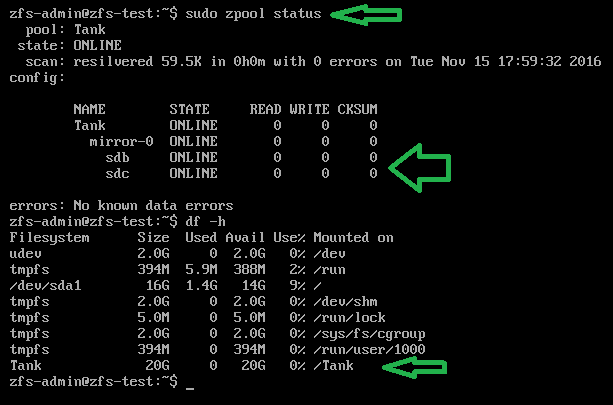
Checking the status and the disks now...


We can see that the pool has not changed size, it's still only 20GB, but we can see /dev/sdb and /dev/sdc are mirrored in the zfs status!

Finally I add their third disk to the mirror, so they have two disks mirroring the pool, which they can detach one from and go take home tonight, leaving two at work... It's a messy solution, but I'm aiming to give them peace of mind.


To detach a drive from the pool, they can do this:

sudo zpool Tank /dev/sdc

And take that disk out and home, in the morning they can add it again and see all the current data get put onto the drive.

So, physical stuff aside they now need nfs to share the "/Tank" mount over the network...

sudo apt-get update
sudo apt-get install nfs-common nfs-kernel-server
sudo nano /etc/exports

And we add the line:

/Tank 150.0.8.255 (rw,no_root_squash,async)


Where the IP address range there is the start of your IP, at home for me this would be 192.168.0.*.

Then you restart nfs with "sudo /etc/init.d/nfs-kernel-server restart", or reboot the machine...


From a remote machine you can now check and use the mount:


Why does this exist?
I think I just won a bet, a friend of mine (hello Marcus) about 10 years ago, I helped him set up a series of cron scripts to perform a dump of a series of folders as a tar.gz file from his main development server to a mounted share on a desktop class machine in his office.

He has just called me in a little bit of a flap, because that development server has gone down, their support had lapsed for it and he can't seem to get any hardware in to replace the machine for a fair while.

All his developers are sat with their hands on their hips asking for disk space, and he says "we have no suitable hardware for this"...

He of course does, the back up machine running the cron jobs is a (for the time) fairly decent Core 2 Quad 6600 (2.4Ghz) with 4GB of RAM.  Its running Ubuntu Server (16.04 as he's kept things up to date!)...

Anyway, he has a stack of old 80GB drives on his desk, he doesn't 100% trust them, but the file they have is only going to expand to around 63GB... So he can expand it onto one of them, the problem is he wants to mirror it actively...

Convincing him this Core 2 Quad can do the job is hard, so with him on the phone I ask him to get three of these 80GB drives, they're already wiped, and go to the server... Open the case, and let me ssh into it.

I get connected, and the above post is the result, though I asked him to install just one drive (which came up as /dev/sdg) and then I set that up as the zpool, then I asked him to physically power off and insert the next disk, where I then connected again and added it as a mirror.

In the end he has 5 actual disks, of dubious quality, mirroring this data, he's able to expand the tar.gz back up onto the pool and it's all visible with his developers again.

This took about 15 minutes... It in fact took longer to write this blog post as I created the VM to show you all!