Showing posts with label examples. Show all posts

Wednesday, 29 March 2023

A mini-break in C++ Optimization (Pt 1)

I have had one of those evenings, in reviewing some code for a friend I came across a repeated pattern where he would iterate over collections, strings and other linear items in a loop and mutate them.  We're of course talking C++ here, and he had this whole myriad of loops all over sanitizing, processing, event summing values.

I asked whether he had access to the STL he immediately got a bit uppity, he and I have never seen eye to eye about using the STL.

I advocate it be used, even just standing something up which you go back and make more performant or more memory efficient later, just stand up your project, don't get bogged down in details of the best string, or the best vector.

He however stands by his having "long tested examples I use all the time, just ignore them"...

No.

Simply put his examples, used in a smattering of programs, peer reviewed very infrequently by a miniscule handful of people is not good enough, use the STL, it is seen by literally millions of engineers, it is very portable and well adopted, use it to your advantage.

We sparred a little about this, but then I simply asked whether he had any parallelism in his algorithms?

Nope, of course STL can just use them.... You can provide the execution policy.

Lets take one of his examples, a simple function to give him the time & date as a character array.

char* GetDateTimeStringHis()
{
time_t now = time(0);
char* buffer = new char[64];
memset(buffer, 0, 64);
ctime_s(buffer, 63, &now);
for (int i = 0; i < 64; ++i)
{
if (buffer[i] == '\n') buffer[i] = 0;
}
return buffer;
}

This returns a character array buffer raw pointer.... No, he interjected, it returns a string.  A raw pointer to memory is NOT a string folks, this is where my argument on that point begins and ends.  This code is very unsafe, I don't like it and I certainly insist it can easily leak memory, for whom is going to delete that buffer?

So I erase that buffer with an actual standard string:

        std::string GetDateTimeStringV1()
{
time_t now = time(0);
std::string buffer(64, 0);
ctime_s(buffer.data(), 63, &now);
for (int i = 0; i < 64; ++i)
{
if (buffer[i] == '\n') buffer[i] = 0;
}
return buffer;
}

he didn't like this, but accepted perhaps that was better, he argued about the string constructor taking a length and a character (zero) to initialize itself with, but went with it.  It's safer, simpler, easier to read code.

I'm still not happy, I don't like that loop:

        std::string GetDateTimeStringV1()
{
time_t now = time(0);
std::string buffer(64, 0);
ctime_s(buffer.data(), 63, &now);
std::transform(
buffer.begin(), buffer.end(), buffer.begin(),
[](const char character) -> char
{
if (character == '\n')
{
return 0;
}
else
{
return character;
}});
return buffer;
}

He hated this, and I have to be honest I don't like the lambda either, but this is correct, using the transform algorithm and the lambda could be expressed in a location it could be reused, or just as a free function somewhere, it doesn't have to be inline here making a mess of reading the code.

What however is it doing?  It changes any new line to a zero in the buffer string, why?  Well ctime_s puts a new line at the end, so if we reverse the iteration we may get a much better performance we can early out of the loop.  But we can even just do away with the whole transform, we know it's the last character so just set it to zero as an optimization and simplification.  My friend can get behind this now:

        std::string GetDateTimeStringV2()
{
time_t now = time(0);
std::string buffer(64, 0);
ctime_s(buffer.data(), 63, &now);
buffer[std::strlen(buffer.data())-1] = 0;
return buffer;
}

We can even further think about this code, what will strlen do?  It might count from 0 to N to find the first zero character as the value, could we therefore count backwards from the 64th position in the buffer?  Well, we know the format of the data and time we get is known:

        Wed Mar 29 23:36:01 2023

Twenty five characters with the new line, adding another for the null termination character, so we can always just set the twenty fourth to zero and reduce the buffer size at the same time to perfectly fit!

        std::string GetDateTimeStringV3()
{
time_t now = time(0);
std::string buffer(26, 0);
ctime_s(buffer.data(), 26, &now);
buffer[24] = 0;
return buffer;
}

I feel I'm getting somewhere, I just want to make sure we use the STL version of the time functions now and use brace initialization for the "now".

        std::string GetDateTimeStringV4()
{
std::time_t now{ std::time(0) };
std::string buffer(26, 0);
ctime_s(buffer.data(), 26, &now);
buffer[24] = 0;
return buffer;
}

This ended my concerns and improved the performance of the code, he was calling this function nearly every time he logged, nearly every time he sent a network message and for very many of his database transactions.  This was 10 minutes of just thinking about the problem.

Now... Back to <algorithm> and execution policy with him...

Monday, 22 January 2018

C++ Simple Limits & Server Recase

Health & Myself
What a whirlwind few weeks I've had, first of all, I've had some minor medical work done so not really been in the mood to do anything very interesting except recuperate in my spare time.  I've also got on-going dental treatment going on, so I'm doubly aggravated.

Next I have been so busy with work, I've had a change of job title, I've been effectively promoted into the lead developer role for the platform/product range I work on; this is sort of a defacto position, as I'm the ONLY developer working in this area at present, however I'm now officially the man on point and am about to reform a new development team around it.  I will be working in Scrum methodology with this new team, we'll be pushing product to both Windows and Linux, Git will be our source control system (no matter what anyone else says) and I'm going to leverage C++ as the core product with tools all being produced in Python, very exciting stuff.

Server Issues
At home however, you may have seen this late night  problem....


I have not, as yet, tackled this problem in any satisfactory manner; there's just been too much going on.

However.... I have a plan, a plan so cunning you could put a tail on it and call it a fox.

I had a look around in the case, and removed the bad drive, here it is....


This is an old drive first of all, and it was only 3.0gb/s SATA, but it was useful as part of my mirror, and without it I'm now naked.  In my room/workspace tidy rambling video you will see I have a stack of WD blue drives on my desk, however I'm at pains to put them into this server, as the more space I give myself then the more data I have to move later, and the less places I have to stash that data.

What do I mean?... Well, that machine already has about 4TB of data in the two ZFS Pools and the one scratch drive, I do not have ANYWHERE else to put 4TB of data, and I can't afford a new drive, hence why I've carefully and strategically informed the wife I'm buying the off 1TB drive once in a while over the last year... Dropping a 4TB drive in the mix, she'll flip.

Recasing my Server & Workstation
So, my plan?


Well, first of all I have my main work station in a trusty, but now rather old, Coolmaster Cosmos 1000 case (you can see this case in some of the very early pages of this very blog)... Now, this is a very nice case, and has 10 internal 3.5" drive bays... So would be pretty nice for my server to move into, add all the new WD drives to it and voila a working server with expansion capabilities.... A recasing, that's a plan... Plus I get to perhaps look at that Xeon mod a year on and evaluate how it got along.... And of course more ZFS fun... Maybe a video about Git & setting up my own ticket handling system.


Right, that's the server... What about the now case-less workstation?

Well, I'm considering a new case, of course.  Front runners are the Corsair Obsidian 750D as it has modular upgrade ability, and if I like it, I can get another and expand the server into it next year.

Infiniband
A long-term project is to consider an Infiniband link between my server and my workstation, we'll see how this goes along, not only would I need to purchase some adapters and cables, but I would need to switch my workstation into a new dual-boot as only Linux would be on Infiniband (and as you may have noticed Windows was on the list of platforms for my new role specification).

C++
Simple limits in C++?.. What am I talking about, hmmm, well I just ran into some code:

auto value (0);
if ( requisitValue < defaultValue )
{
    value = requisitValue;
}
else
{
     value = defaultValue;
}

Nothing wrong with this you may argue, however the developer hadn't looked at the values they were working with, the defaultValue for this system locale was ALWAYS the highest value on a sliding scale, the configuration insisted the default be the cap and so any requisite value would be smaller.

I asked the chap to have a think about this code, having explained the requisit would always be lower than the default, and asked him to come up with any improvements.  He did....

auto value(
  (requisitValue < defaultValue) ? requisitValue : defaultValue);

I asked him to rationalise this change, why had he done it?


  • To meet the coding standard define of not assigning, but to initialise with a value
  • To make the code less lines of code
I have no disagreement with the first point, the second... Not so much....

I do not subscribe to needing code to be smaller (less lines of code) so long as it's readable, as for my work maintainability far out reaches using less lines of code.  Especially when the change made is exactly the the same resulting code, just the change is far harder to read.


(Don't miss-read this, I agree you should try to make functional code take less lines of code, but the above is white-space more than functional change, white-space on a modern compiler is NOT a problem, make your code readable before you start trying obfuscating functionality for fancy frills).

I stopped the developer in his tracks however, and asked him to pull up the document for the specification and describe "defaultValue"... "The maximum amount allowed in the value" he read.

So, changing the name of this value was the first step it became "MaximumValue".  Use a meaningful name.

And finally, if you really want this decision to be a single line of code, how about:

auto value(
    std::min<valueType>(
        requisiteValue,
        maximumValue));

Using the minimum function here, we make it clear we're doing a mathematical operation, it's a single line instruction (even if I do stagger it for readability over four), and we're not going to confusing the order of our parameters, so avoid introducing comparator ordering bugs later.

This is the simplest way to find a limit between two variables of the same type in C++, using std::min and std::max.  Learn about them and love them.

The reply the young man gave me... "But changing the name'll mean I have to change hundreds of different places in the code!".... "Yes, so use find & replace in files?".... "Oh but what about all the other "defaultValues?".... "Why are they not in namespaces, or classes, or using other names?"... Silence.

Tuesday, 29 August 2017

Story Time - My First Serious Program

Having a basic knowledge of Commodore Basic v2.0 I took to my A-Levels in 1994 and started to learn Pascal, both "Turbo Pascal" on DOS and "Personal Pascal" on my Atari ST.

One of the first things I did, as most kids do is start to write a game, it was a 2D grid style war-game, 28x28 tiles to a map and maps stitched together, it was very roughly based on a table top game I had which itself was a dice & splice of the Guadalcanal Campaign of World War 2... Anyway, I had jungle, and grass, Desert and beaches, water and the tanks, and troop counters moved around, you could air-drop paratroopers into spots when you had earned enough points, and I last worked on it in around 1995 when I started to add Sound Blaster driven 16bit effects into it.

But, I also needed tools, I was working on DOS, with no Windows - I didn't get Windows 3.1 until later that year - and at college the compiler only ran in DOS, to stop the compiler and loads Windows, then execute a GUI tool just to exit again and load the IDE was not a workable solution, therefore I started to write a bunch of EGA based tools directly in DOS, drawing graphics in DOS.

The first tool was a simple string comparer, almost a version of "Diff" which I used for comparing old and new files.  The second tool was a back-up tool, to indicate the copying of files into a floppy, so I could squirrel them away.

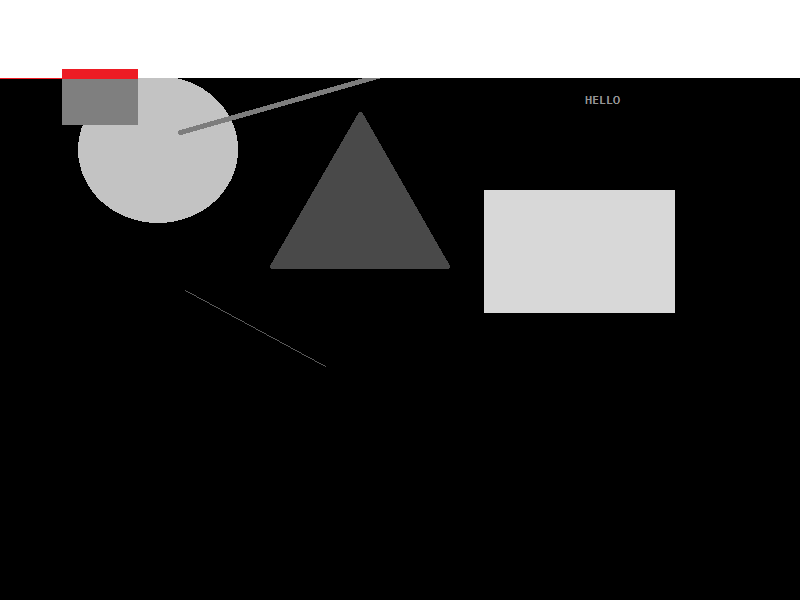
Finally, I needed a serious tool, this was a graphics tool... Almost a version of Paint for DOS.  To help design maps and other information in my game.  It worked by letting me place squares and circles, lines and even text into set places on the screen... It looked just like this...


Unlike anyone else in the class of A-Level students (as far as I know) I was the only one who knew about Interupts and could therefore use the mouse in DOS, so this blew a few people away.

This could save my image too, and I built up a very basic form of "Vector" graphics, without actually knowing what vector graphics were.

Later on, I came to add scale and delete to these items too, and this is where my innocence as a new programmer came along, I first started doing delete by using "GetPixel" to return the colour of the pixel below the mouse cursor, however, this failed terribly the moment I run it up and realised if I clicked on either the red circle or the red square both would vanish and I only had 16 colours in my pallette and really got disheartened.


So, I came up with a scheme to get more colours and workout which item I had clicked on... I went to grey scale, I converted each shape in the list of shapes to a grey scale of RGB (0x01, 0x01, 0x01) to RGB (0xFE, 0xFE, 0xFE)... This suddenly gave me 253 possible shapes in my list (as I used black and white as control colours), but 16 versus 253 I thought I was making HUGE strides.


I could then look up the pixel at the X, Y of the mouse to delete the actual shape below the mouse when delete mode was set... Nifty... So my mind thought, it was certainly a programming exercise, and very laborious on the 25Mhz 486 CPU's the college had.  Only much later did I think about accessing the back-buffer directly, locking the bits and stepping over the image in scan lines at vastly higher speed, anyway...

My next challenge for this program was to stop shapes overlapping, I immediately went to my grey scale mode, and started to so this... as the song goes... with "White Lines".... 


As the line of white moved across line by line, pixel by pixel, really really slowly, it checked if it found a grey - rather than black - making the pixel flip from RGB (0x00, 0x00, 0x00) to (0xFF, 0xFF, 0xFF), if the pixel ALSO was the RGB of the Grey shape I was adding, then this was left black, like so...


And I knew the shape was "free floating", with no overlaps... However, if there was an overlay, I added the RGB differently... So I could see the overlay... like so...


I was not only doing the processing live on screen, but it acted as a debugger for me as I went, without needing to spool up the Turbo Pascal Debugger on my measly 543K of free RAM.

This was a serious amount of work for me, when I learned a lot more about programming I came back to this briefly, but it never warmed my cockles more than when I wrote this program for the first time, I learned so much, I learned patience, to think a head, to plan, to process flow, to research the topic and ultimately to get things done first - in a prototype - and then revisit them.

I also ultimately used this same code later, at university in C++... Making this the first time I had prototyped a working application in one language (Pascal) and converted it to another (C++) and could say it was properly prototyped.  The latter use as as s tool to layout gardens in a sort of designer, I remember far less about the C++ version than the Pascal version.  But it's shadow lasts a long time, and remains over me today, I recall so much more about this one application than most of the others I wrote at the time, because it was something I engaged with.

I can only express to any budding programmer today, no matter that language you use, to just dive in there... 

Wednesday, 5 April 2017

Development : Anti-Hungarian Notation

Whilst cutting code I employ a coding style, which I enforce, whereby I output the scope of the variable being used with a prefix.

"l_" for Local
"m_" for Member
"c_" for constant
"e_" for enum

And so forth, for static, parameter and a couple of others.  I also allow compounds of these, so a static constant would be:

"sc_"

This is useful in many languages, and imperative in those which are not type strict, such as Python.

Some confuse this with "Hungarian Notation", it's not.  Hungarian notation is the practice of prefixing a type notification to the variable name, for example "an integer called count" might be "iCount".

I have several problems with anyone using Hungarian Notation, and argue against it thus. With modern code completion and IDE lookup tools this is really not needed, with useful and meaningful naming of your variables the type is not needed and finally there are multiple types with the same possible meaning... i.e. "bool", "BYTE" and "std::bitset" are they all 'b'?  What about signing notation, so you compound "unsigned long" as "ul" to the name?

It all gets rather messy, a good name is enough.

However, the scope of the variable might change, the scope might not be enforced, and in none strict languages you might have a variable go out of scope and then automatically re-create the value with a blank value, if you don't follow your scopes.

Therefore I can justify my usage and enforcement of this coding standard.

What I can't stand however is when someone listens to my explaining this, they read my coding standards document, they even go as far as having me reject their code during peer review for these reasons, and then they dismiss my comment with the "it's just Hungarian Notation"... Scope is not type, and type does not define scope, don't be fooled!

Monday, 12 December 2016

What TLA are you today?

TLA... TLA... A kingdom for your TLA... That's three letter acronym by the way... Well, strictly three letters is not the limit, but I'm extremely annoyed this week at hearing all these random seeming strange acronyms being thrown around...

I've heard....

CCNA, ITIL, MSCE, CIT, BACCT and EMECH today alone...

Some I have heard of, some I've not, the last is so generic as to be equivalent to "I read a book, once".

So lets cover my opinion of  a few of these, the Cisco certification, it's clearly fine and required to work with their kit, I've always found reading Cisco manuals to be a torture; but as a pfSense convert I no longer have many issues with Cisco kit.

ITIL, I actually myself started to read this course, it was... It wasn't that useful, practicality wise at least, it relied a lot on Microsoft specific software, run to Linux and be set free!

MSCE, this was the classic "well you did graduate a few years ago, but now you need this" qualification.... However, now... Not so much, at all... Especially when you use a compiler other than Microsoft's more often than not!

The rest, well... I'll be honest I'd never heard of them... However, I don't take an effective CV as being one containing a whole bunch of these acronyms.  I am not the kind of reader, or reviewer, to just think "shit I don't know that acronym the writer of this CV must be real smart!"... No, I actually look it up, and you know if I google for your qualification and can find only adverts for places offering the course, I think the course is only good for those selling it, it's not actually very good for those of us trying to decipher your ability....

Lets draw a line under this discussion and just focus on something else...

I just talked about your ability, if you want to quantify your ability go right a head, but I'll personally take your worth, how much do you value the work, how do you communicate your wish and will to succeed?... That's more important than any paid to read cookie cutter course in my opinion.

Thursday, 21 April 2016

C++: Boost Libraries, Code Documentation & Examples

I have a loving relationship with the Boost C++ libraries, but I have a real hate of their documentation, not just it's style, but the mistakes and fragmentation they build into it.

When I search for say "socket", I want it to take me to boost::asio::tcp::ip::socket.  But instead it takes me on a run around, and when I finally get to boost::asio::tcp::ip::socket the examples and namespace being used is incomplete, it assumes a bunch of things, and you get told to look in tcp::ip::socket.

This is fine, if your reader knows to assume boost::asio as well, but if you're new to the whole boost project, you don't know sockets live in asio, you might be looking for boost::net, or boost::networking, or boost::network or just boost::tcp.  And you're stuck, lost, you have to leave the boost documentation search and go to google.

To fundamentally have to leave the documentation of an actual project website, and use a third party in this way is fundamentally telling you your documentation is flawed.

Then, there are mistakes in the documentation, this is annoying, but when the mistakes are in the examples given it's unforgivable, you're basically giving your users the finger, because not only are you teasing them with an example, but when it doesn't work they are again cast out into the wilds of the internet.

Case in point, again the socket, it's example code shows it as "soocket".  A typo yes, but it tells me two things, first of all, the code was not proof read, and second; and perhaps most importantly; the examples are not from working code, they've never been run, because it's not soocket, and the compiler would instantly tell anyone trying to run that code soocket is invalid.  Examples SHOULD ALWAYS BE LIFTED FROM A WORKING EXAMPLE!

Friday, 25 April 2014

Load/Save Virtual CPU Memory State & Debugging Code (C++)

Before we go further with our CPU project we need to do some house keeping on the code, we need to add some helpers, the first I'm going to add is a "debug" flag to the CPU code, this is not an official part of our specification, so we leave our diagram for the chip unchanged.

This flag however is going to make some logging come out of our code, so we need to add the following headers to the CPU class header.

#include <string>

And inside the CPU class we're going to add a new function:

void Log(const std::string& p_Message);

The body of this function is going to be very boring:

void CPU::Log(const std::string& p_Message)
{
std::cout << p_Message << std::endl;
}

Simple squirting the message string to the output stream.

And we're going to add calls to this message function from all the other functions we use, so we know what the CPU is going to do... But first we need to add the new flag to the CPU:

bool m_DebugMode;

Then update the CPU class constructor to default this to false....

CPU::CPU(Memory* p_TheMemory)
:
c_ReservedAddress(0),
c_BaseAddress(2),
c_JumpToAddress(1),
c_AddressCeiling(253),
m_ProgramCounter(c_BaseAddress),
m_Register0(0),
m_Register1(0),
m_OverflowError(false),
m_UnderflowError(false),
m_SignedMode(false),
m_TheMemory(p_TheMemory), // DOH!
m_Halt(false),
m_DebugMode(false)
{
}

Next we need to be able to create the CPU in debug node, so we're going to add a parameter to the constuctor, but we're going to make this parameter optional, if the programmer does not pass the flag it will default to false, i.e. no debugging.  Only when they actively pass the flag as true will one see the debug output.

CPU(Memory* p_TheMemory, const bool& p_DebugMode = false);

And the implementation:

CPU::CPU(Memory* p_TheMemory,
const bool& p_DebugMode)
:
c_ReservedAddress(0),
c_BaseAddress(2),
c_JumpToAddress(1),
c_AddressCeiling(253),
m_ProgramCounter(c_BaseAddress),
m_Register0(0),
m_Register1(0),
m_OverflowError(false),
m_UnderflowError(false),
m_SignedMode(false),
m_TheMemory(p_TheMemory),
m_Halt(false),
m_DebugMode(p_DebugMode) // AND THIS!
{
}

This code compiles, we've changed the CPU constructor, but our code can still call it with just the memory parameter because we've specified a default for the debug mode!

Our first piece of logging is if we get an unknown OP Code, in our Decode function we need to add a new case, the default case... And we want to stop the application running if there's an invalid op code:

default:
Log("Unknown Op code - halting");
Halt();
break;
I'm going to set mine to log and then Halt, you might just want to Log, its up to you.  I always want this to happen, so there's no checking for debug mode!

So what do we want the CPU to outptu when we're in Debug mode?... Well the program counter each step would be good to know, so how about we start in the while loop within the Run function, before the Fetch we can add the following code:

if ( m_DebugMode )
{
    std::cout << "[" << (int)m_ProgramCounter << "]" 
              << std::endl;
}

Next in each op code function I'm going to add a debug message with "Log", so here's a few:

void CPU::Load1()
{
if ( m_DebugMode )
{
Log("Load1");
}
Or

void CPU::JumpEqual()
{
if ( m_Register0 == m_Register1 )
{
if ( m_DebugMode )
{
Log ("Jump Equal - Jumping");
}
JumpTo();
}
else
{
if ( m_DebugMode )
{
Log ("Jump Equal - Not Jumping");
}
// Skip over the address of the jump!
++m_ProgramCounter;
}
}

Or

void CPU::ClearBoth()
{
if ( m_DebugMode )
{
Log("Clear Both");
}
ClearRegister0();
ClearRegister1();
}

Then we also have functions which we want a little more debugging out of... Such as Add, it would be useful to have the values of the registers before and then after...

void CPU::Add()
{
if ( m_DebugMode )
{
Log("Add");
std::cout << "Before [" << (int)m_Register0 << ", " << (int)m_Register1 << "]" << std::endl;
}

m_Register0 = m_Register0 + m_Register1;

if ( m_DebugMode )
{
std::cout << "After [" << (int)m_Register0 << ", " << (int)m_Register1 << "]" << std::endl;
}
}

So we stream out the two registers before and after, and the same in multiply, what about a more complex operation like store?... Well, we could output the register when we've read in the target address, then output the value from the register we're saving and then we know what we jsut wrote & where.

void CPU::Store()
{
if ( m_DebugMode )
{
Log("Store");
}

// Load the target address into register 1
m_Register1 = m_TheMemory->Read(m_ProgramCounter);

if ( m_DebugMode )
{
std::cout << "Target Address: " << (int)m_Register1 << std::endl;
std::cout << "Value to Write: " << (int)m_Register0 << std::endl;
}

++m_ProgramCounter; // Skip the memory location data
// Write the register 0 value to this address
m_TheMemory->Write(m_Register1, m_Register0);
// Remember the order of our parameters
// was ADDRESS then VALUE!

if ( m_DebugMode )
{
std::cout << "Written value: " << (int)m_TheMemory->Read(m_Register1) << std::endl;
}
}

Finally to use the Debug Mode we need to add something into the main program... Well, I'm going to have a bool set to false, and add an option to my menu which toggles the flag... So everytime I use the toggle option debugging switches "debugging = !debugging", and on the menu I'm going to output the debugging setting.  You can do this yourself :)

Once done I just feed this into my "new CPU" call as the second parameter, and voila I can turn CPU debugging on and off to run my program.

Next, typing in all those program bytes is getting on my nerves, so how about we load them from a text file?

In the main menu I'm adding "S" and "L" and they are going to Load and Save the current memory, given a filename.

I'm going to pipe these to a simple pair of functions which ask for a filename, and then call into the Memory Class to load and save itself.

So the two functions I'm adding to the main program are like this:

void LoadMemory(Memory* theMemory)
{
if ( theMemory != nullptr )
{
cout << endl << "Load Memory from: ";
string filename;
cin >> filename;
theMemory->Load(filename);
cout << endl;
}
}

void SaveMemory(Memory* theMemory)
{
if ( theMemory != nullptr )
{
cout << endl << "Save Memory to: ";
string filename;
cin >> filename;
theMemory->Save(filename);
cout << endl;
}
}

In the memory header I then add "#include <string>" and these two function prototypes:

/// Save to file
void Save(const std::string& p_Filename);

/// Load from file
void Load(const std::string& p_Filename);

The memory save function is then very simple, for each byte in our address space (including bytes 0 and 1) we're going to write out the integer as text on a line, so each line of our file will contain one byte.

void Memory::Save(const std::string& p_Filename)
{
using namespace std;
ofstream file (p_Filename, ios_base::out);
if ( file.good() )
{
for (byte i = 0; i < c_MaxAddress; ++i)
{
file << (int)m_MemorySpace[i] << endl;
}

file.close();
}
else
{
cout << "Bad path [" << p_Filename << "]" << endl;
}
}

If we could not open the file, then we output bad path.

Load is similar, but we don't know how many bytes the user might give us, so lets follow through the code:

void Memory::Load(const std::string& p_Filename)
{
Clear();
So we've cleared the memory and everything is zero, we now know we need to open a file, so at the top of the file I'm going to add "#include <fstream>" and we also know we're going to convert the text we load into a binary number in memory so we need "#include <cstdlib>" the standard C library implementation for C++.

Our code then continues, opening the file and checking its good:

using namespace std;
ifstream file(p_Filename, ios_base::in);
if ( file.good() )
{
Next we need two values the index (byte) we've read to  and a temporary location for the text to number conversion we're doing each step.

int i = 0;
int temp;
And while the file is good, that is whilst we've not run out of bytes...
while ( file.good() )
{
Read a line of text...
string buff;
file >> buff;
Convert it from text (ascii to integer)...

temp = atoi(buff.c_str());
And then we assign the byte we loaded into the memory space we've got, and move onto the next memory index.

m_MemorySpace[i] = (byte)temp;
++i;
}

file.close();
}
else
{
cout << "File not found [" << p_Filename << "]" << endl;
}
}

This function is quick and dirty, it has some problems, if you can see them or want to address them and check back with me what you spot to build experience/knowledge let me know in the comments below.

Now when we want to write a program, we can just open a text editor, add two lines with "0" and "0" on them at the top to skip our reserved memory area and then enter bytes of memory...

Remember once you've used load, you can use Report Memory to list back what you've loaded.

So go a head try to use your virtual CPU before you just jump to the page with the code.