Showing posts with label pascal. Show all posts

Sunday, 10 November 2019

My First Piece of Software

What was the first piece of commercial software you wrote and what did it do?

This was a good question I was asked by a student interviewing me about my entry into being a software engineer, so I thought I'd share the answer.

It was a PC auditing software application, written in Turbo Pascal for DOS, it scanned your files identified a bunch of known executable and produced a finger print of your machine (linked to either the network Mac address or the BIOS serial number) it showed a number on the screen and I had a silver (label) punch to put that number into a hard metal sticker and put that onto the PC case.

This was used by Claremont Garments* (by me actually) to audit most all the machines they had, it was related to a commercial product we'd bought to do a similar task, but after a bit of tinkering I found my own solution did the task better, and I could export the data to a spreadsheet to produce reports more easily and cheaply than paying for the custom import tools.

I used this software throughout the UK, I sent it to a bunch of folks working with me from the London office and then North East office and finally it went with me for my sojourn in Morocco to audit everything.

I was actually waxing lyrical just today about in order execution of the 486, that first piece of software of mine was definitely operating "in order".

To this day I have fond memories of programming in Pascal for DOS.  And though this was not the first major piece of software I'd written, it was the first used for a commercial purpose and by someone other than me.


* Interesting link to the past, the Claremont site at which I worked was the Selston Factory, which is the town in which I now live... I have fond memories of that job, and I think a fair few people around here remember that factory.  It lives on under "Lilley Close" which is built on the site, but there is a commemoration of the factory in its original "Wood Bastow" incarnation.... That maybe another post I put together, to share with you all.

Tuesday, 29 August 2017

Story Time - My First Serious Program

Having a basic knowledge of Commodore Basic v2.0 I took to my A-Levels in 1994 and started to learn Pascal, both "Turbo Pascal" on DOS and "Personal Pascal" on my Atari ST.

One of the first things I did, as most kids do is start to write a game, it was a 2D grid style war-game, 28x28 tiles to a map and maps stitched together, it was very roughly based on a table top game I had which itself was a dice & splice of the Guadalcanal Campaign of World War 2... Anyway, I had jungle, and grass, Desert and beaches, water and the tanks, and troop counters moved around, you could air-drop paratroopers into spots when you had earned enough points, and I last worked on it in around 1995 when I started to add Sound Blaster driven 16bit effects into it.

But, I also needed tools, I was working on DOS, with no Windows - I didn't get Windows 3.1 until later that year - and at college the compiler only ran in DOS, to stop the compiler and loads Windows, then execute a GUI tool just to exit again and load the IDE was not a workable solution, therefore I started to write a bunch of EGA based tools directly in DOS, drawing graphics in DOS.

The first tool was a simple string comparer, almost a version of "Diff" which I used for comparing old and new files.  The second tool was a back-up tool, to indicate the copying of files into a floppy, so I could squirrel them away.

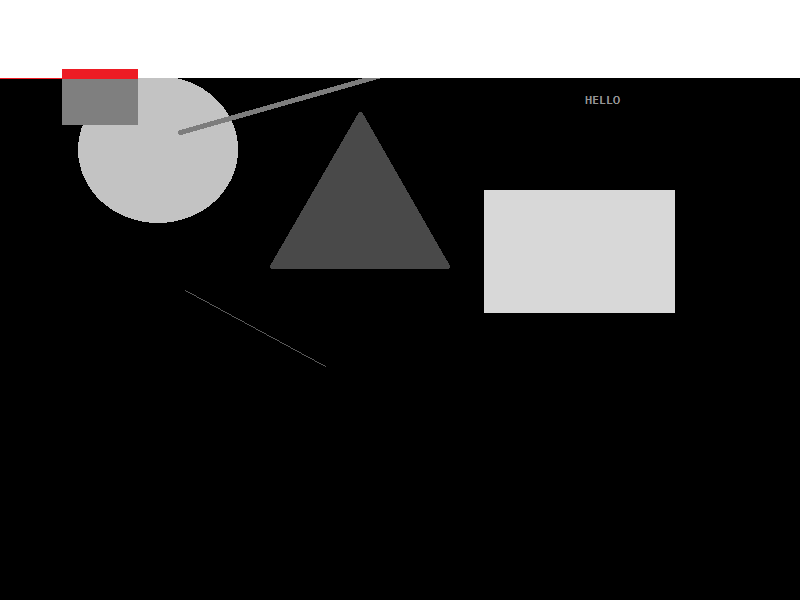
Finally, I needed a serious tool, this was a graphics tool... Almost a version of Paint for DOS.  To help design maps and other information in my game.  It worked by letting me place squares and circles, lines and even text into set places on the screen... It looked just like this...


Unlike anyone else in the class of A-Level students (as far as I know) I was the only one who knew about Interupts and could therefore use the mouse in DOS, so this blew a few people away.

This could save my image too, and I built up a very basic form of "Vector" graphics, without actually knowing what vector graphics were.

Later on, I came to add scale and delete to these items too, and this is where my innocence as a new programmer came along, I first started doing delete by using "GetPixel" to return the colour of the pixel below the mouse cursor, however, this failed terribly the moment I run it up and realised if I clicked on either the red circle or the red square both would vanish and I only had 16 colours in my pallette and really got disheartened.


So, I came up with a scheme to get more colours and workout which item I had clicked on... I went to grey scale, I converted each shape in the list of shapes to a grey scale of RGB (0x01, 0x01, 0x01) to RGB (0xFE, 0xFE, 0xFE)... This suddenly gave me 253 possible shapes in my list (as I used black and white as control colours), but 16 versus 253 I thought I was making HUGE strides.


I could then look up the pixel at the X, Y of the mouse to delete the actual shape below the mouse when delete mode was set... Nifty... So my mind thought, it was certainly a programming exercise, and very laborious on the 25Mhz 486 CPU's the college had.  Only much later did I think about accessing the back-buffer directly, locking the bits and stepping over the image in scan lines at vastly higher speed, anyway...

My next challenge for this program was to stop shapes overlapping, I immediately went to my grey scale mode, and started to so this... as the song goes... with "White Lines".... 


As the line of white moved across line by line, pixel by pixel, really really slowly, it checked if it found a grey - rather than black - making the pixel flip from RGB (0x00, 0x00, 0x00) to (0xFF, 0xFF, 0xFF), if the pixel ALSO was the RGB of the Grey shape I was adding, then this was left black, like so...


And I knew the shape was "free floating", with no overlaps... However, if there was an overlay, I added the RGB differently... So I could see the overlay... like so...


I was not only doing the processing live on screen, but it acted as a debugger for me as I went, without needing to spool up the Turbo Pascal Debugger on my measly 543K of free RAM.

This was a serious amount of work for me, when I learned a lot more about programming I came back to this briefly, but it never warmed my cockles more than when I wrote this program for the first time, I learned so much, I learned patience, to think a head, to plan, to process flow, to research the topic and ultimately to get things done first - in a prototype - and then revisit them.

I also ultimately used this same code later, at university in C++... Making this the first time I had prototyped a working application in one language (Pascal) and converted it to another (C++) and could say it was properly prototyped.  The latter use as as s tool to layout gardens in a sort of designer, I remember far less about the C++ version than the Pascal version.  But it's shadow lasts a long time, and remains over me today, I recall so much more about this one application than most of the others I wrote at the time, because it was something I engaged with.

I can only express to any budding programmer today, no matter that language you use, to just dive in there... 

Monday, 8 May 2017

Software Development : Get Constant in C++

What does "const" mean to you?  Does it just mean a value can not be changed?  If so, you may want to read on!

Const is one of those things, which though not unique to C++ is given more meaning when you leverage C++ fully, const allows you to not only define a value as invariant, but also to instruct other programmers coming to your code how a value should be used, how when it is passed as a parameter it should be treated and ultimately how to protect data from needless alteration, de-synchronisation or simple corruption.

Const is therefore your friend, and if you've come to C++ from C, Java, C#, Python or one of the other myriad of languages which don't treat const with as much relevance as C++ you may want to read more than I can say on the topic. 

Bjarne Stroustrop (the inventor of C++) and other authors on the topic (notably Scott Meyers & Herb Sutter) explain in much more detail than I ever could, but for brevity here are two examples of const from my own coding standard which I implore you to digest.

1. Initialise Const Values in the constructor ONLY....

Any instance of the "Ex" class can now access it's "Pi" value, and we communicate to all viewers that the value is a constant and only edited in one place.

2. Where-ever possible pass values as constant references....

We know for certain that the "p_Radius" parameter being passed is NOT to be changed by the function, this is important when you are thinking about letting code document itself, and easily accomplished with "const", and especially annoying when using a language lacking const!

Whatever you do, use const consistently, this needs no specific explanation here, however if you begin following my second rule, you must stick to it!  Don't change half way through a program, if you import a third party API which is not using const in the same way, abstract that third party interface away with a series of your own shims, to make it correct for your usage (the compiler will optimise all these layers away) to leave you with consistent and more easily maintainable code.

You can find must much more about const-correctness elsewhere, I'd start here.

Thursday, 2 June 2016

Software Engineering : My History of Odd vs Even

I've been a avid fan of Intel's processors since my very first PC, powered by an Intel 80486 SX-25 it taught me so much, it also got me into a lot of trouble once, being an SX it was essentially a DX unit with a failed floating point unit at fabrication.  But Intel being the trixsy tech wizards they are, they didn't throw all those chips away, they simply disabled the broken portions, kept the working addition and subtraction sides and sold them under the SX label.

This of course led to some interesting differences between the SX & DX chips, the most obvious being the multiplication behaviour, on a DX to multiply to numbers you simply loaded each into a register and executed the one step multiply.  However, on an SX you loaded the start value, and the denominator into two registers and then looped through for a number of times adding them.  So the pseudo assembly code for it might look like this:

      LDA 3
      LDB 10
MUL:  ADD LDA,LDA
      DEC LDB
      JNZ LDB,MUL
      SAV LDA,RESULT

Where we find us loading up the two registers, then performing an add in a loop until we've added enough times.  This is of course a lot slower than:

      LDA 3
      LDB 10
      MLT LDA,LDB

And, the more you multiply the slower the SX could behave.  It wasn't as simple as this, however, for demonstration purposes we'll assume it was, there's no need to comment telling me I'm a moron (again) I know I am, but this is only a demo.
      
But this little SX machine was the only machine I had, and I was moving my programming skills from the playground of the Atari ST to the PC proper, and so I chose to try and get a lot of juice out of the machine.  On trick I learned was to page through screen memory scanning for shapes, but of course I quickly needed a bunch of math functions.  Using the CMath library was quite slow on the SX, so I started to find quicker home-brew alternatives.

Initially I had no idea I was working around my own CPU's hindrances (I only found this out later, when I realised on a DX2-66 chip I was getting magnitudes better performance).

One hunderance, of function, I worked around was odd & even... To calculate this, you would usually use a remainder, by division, in C this might look like this:

int remainder = 34 % 2;

Remainder would have a zero value for even values

const bool OddEven (const int& p_Value)
{
    return ( ( p_Value % 2 ) == 0 );
}

I was doing this in Pascal at the time, the syntax of which I have forgotten.  But you can see, it is a fairly simple function call, quite non-descript.  My problem on the SX was it ran so slowly.  A lot faster was to convert the value into a string, and inspect the last character!

bool l_IsEven = true;
int l_Number = 42;
char* l_str = new byte[16];
memset ( l_str, 0, 16 );
sprintf( l_str, "%i", l_Number );
int l_lastCharacter = strlen(l_str);
switch ( l_str[l_lastCharacter-1] )
{
     case 1:
     case 3:
     case 5:
     case 7:
     case 9:   l_IsEven = false;
                   break;
}

So, we get a value in l_IsEven more quickly, and it was indeed quicker for me to do this...

However, when I first looked at this problem, I had no itoa, nor sprintf, all I had was integer control.  Indeed, in the programming language suite I started with the only way to get text easily from a value reference to a string of characters was to write them to the screen with "write" and then to move back to the start of the line with a return carriage, and then to "read" the line again.

This was very very very slow, much slower than even the switch statement bastardization above.

So, I set about it the most logical way my 14 year old mind could think of...

It took the number, and did this:

bool l_IsEven = false;
int l_Number = 12354;
while ( l_Number > 10000 )
{
     l_Number = l_Number - 10000;
}
while ( l_Number > 1000 )
{
    l_Number = l_Number - 1000;
}
while ( l_Number > 100 )
{
    l_Number = l_Number - 100;
}
while ( l_Number > 10 )
{
    l_Number = l_Number - 10;
}
switch ( l_Number )
{
    case 0:
    case 2:
    case 4:
    case 6:
    case 8:   l_IsEven = true;
                 break;
}

This of course was totally horrible, and I quickly stopped using it in favour of the string method, and later in favour of the remainder function.

However, this horrible history of code remained in one of my header libraries, at the time they were Turbo Pascal Unit files (TPU), but when I went to University at 18, some four years after writing this original code I had tried to convert some of my Pascal support libraries to C and then C++.

One of the legacy calls I converted, without even looking, with an automatic tool was this very stupid function above... And yes, it ended up in at least one degree level project (oh what a fool I looked).


P.S. I'm sorry to report, I've never owned an AMD processor... However, I did have a Cytrix x86 to upgrade this very Intel Chip!

Friday, 1 April 2016

Coding Standards: Functional Programming (Code Maintainability)

Functional Programming

When I were a lad, and was being taught to program, I read a bunch of Basic code and wrote great long lists of instructions; that's pretty much how many people in the 90's described programmers, coders or hackers "someone who spends lots of times typing great long lists of instructions into their computer" - Robert X Cringley.

However, long lists only get you so far, so my next step into the world of programming was to learn Pascal, and I first read a simple book as part of my A-Level, by P. M. Heathcote, which introduced very basic programs in Pascal, something like...

program HelloWorld (input, output)
begin
    println ('hello world');
end;

So, I suddenly had this idea of putting the long lists of instructions into sort of functions:

program HelloWorld2 (input, output)

   procedure foo()
   begin
       println ('foo');
   end;
   
   procedure bar()
   begin
       println ('bar');
   end;
   
begin
   print ('hello ');
   foo();
   print (' and hello ');
   bar();
end;

(Note: before you call me out and say you can "GOSUB" or "CALL" other functions in BASIC, not in the dialect I first learned, all you could do was SUB to a line number, following the instructions until you used RET to go back to where you were... So they were technical functions, or procedures, but they were really just more lines of code within the huge list of lines of code, no indentified in anyway, except by comments, as being functions).

Interestingly at this time, I was taught there were two kinds of functions you could call, ones which returned a value, known as "functions" in Pascal, and ones which didn't return anything known as "Procedures".  These latter you'll be very aware of from other langugages like C, where the return type is part of the function declaration, so "void foo();" obviously doesn't return anthing, whilst "int bar();" returns an integer.

That "Procedure/Function" definition stuck with me a long while, I was a kid, I was taught something and got a certificate to say to the world "He knows what he's talking about", so it was with some trepidation, years later, that I had to admit it was rubbish and everything was a function.

And this revelation came with my being taught about "Functional Programming", this was important for large projects written in languages like C, because you really wanted to start to learn how to keep functions doing one task.  So when you designed, named, write and test a piece of code, you can break it down, and know each piece, or each function, is doing just one job.

"void Max(const int& p_Left, const int& p_Right, int& p_Result)"

Here I've just defined a function prototype, even without my explaining, I'm pretty sure you could guess what it does... Yes, it takes the left and right integers given and decides which is the bigger, placing that value in the result.

We can design code, define the prototype, and hand the nitty gritty of the actual code body of to someone else, to write the body of it, or just to test our implementation works.  And though this is a trivial example, think about a single function to say format a disk, it might contain calls to dozens, or hundreds, of other functions, but it itself does one task, and each sub task is itself kept in a single function so you break the whole job down.  Within your large projects therefore you maintain a level of ease in how to debug, maintain and update the code, if your "foo" function doesn't work, just fix that one function and re-test, there shouldn't be multiple-foo's and there shouldn't be more than one task performed within the code inside "foo".

This was the first major meeting, and teaching, I had on "Functional Programming", and it was something I took to heart.  My code took on very much a "one function" style, where each function had a single purpose.

Twenty years on, and even in an Object Orientated world (of C++, C# and Java) I utilise the functional idea.

The main thing applying the single function ideal to my code has lead to is a vast improvement in maintainability, this has been important for my job and on going sanity with large projects.

However, there are other caviates, for there are other parts to functional thinking which have to be taken into account.  For example, are you going to allow functions in your code to have just one, or multiple exit points from a function?  For example:

const int bar (const int& p_i)
{
   return p_i * 2;
}

const int foo ()
{
    if ( x > 0)
    {
        return bar(x);
    }
    else
    {
    return bar(-x);
    }
}

This is perfectly reasonable code, foo does one job, deciding upon the value of x which value to pass, however, this is a trivial example, what if there are tens, hundreds or even thousands of different paths you could take as the result of foo?... A case statement with every character possible already throws hundreds of options our way, so it's not out of the ordinary.

You could be tracing through this code and ANY of those many exit points could fail, causing a crash, which you then have to dig through after the stack has all unwound.

Using many exit points is fine, if you can justify it, please don't get the impression I'm hating on the concept, if you have a low memory situation for example, I can see you won't have space spare for my suggested solution; and this is part of the many trade-offs you will learn about in a career of programming, when to, and when not to employ a technique.

But in the above example, I would change foo as follows:

const int foo ()
{
    int l_result = 0;
    if ( x > 0)
    {
l_result = bar(x);
    }
    else
    {
    l_result = bar(-x);
    }
    return l_result;
}

So, you see I have a local value copy, this is using more memory, and wants to allocate that memory... and there are other options than allocating that as a local variable, but for maximum maintainability keeping that value within the actual function is a key feature of this example.

And so how does this assist in maintainability?  Well, we can now debug the function a lot more easily, we can see the value of "l_result" at any moment in a watch within the debugger, we can wrap individual - failing - calls to "bar" into try-catch statements and debug the returned value for the whole function at the return at the bottom.

I've seen some horrors in the poor use of both returning from within a function, where return points are hidden three, four or more nestings deep, and it's made for nothing but frustration, try to avoid multiple function exit points.

What else does functional programming offer us?... Well, it also offers us an easy way to make code self-documenting, if we have a function like the "max" function earlier, it explained itself in just it's definition, take advantage of that fact.

But what about functions inside objects?  I hear you cry, well lets take a pure C++ example, in C++ (or at least most C++ compilers) we're allowed to just define a function prototype and go to town, but that's really; technically; C not C++.  To make things C++ we really should have the functions all inside a class definition... I stick to this idea, even if we just need a pseudo class of static functions:

class Helpers
{
    public:
    
          static void Max(const int& p_Left, const int& p_Right, int& p_Result);
          
          static const int Sum(const int& p_Left, const int& p_Right);
          
 };

 One can see what the functions mean, and the function have meaningful names, the class itself can have, a useful name, and indeed the class can then be in a namespace which itself has an even more useful name.  So we build up not complexity, as some assume, but ease of division of functionality, breaking numbers from user interfaces from strings from file management, break it down, divide and conquer, that was the original purpose of functions in computing, and so that original function is now emphasised in the languages and methods we employ today.

 C++, C#, java, Python, all can benefit from using the function idiom... Your projects certainly can.