Showing posts with label Boost. Show all posts

Saturday, 21 July 2018

C++ : Coding Standards by Example #1 (with Boost Beast)

Today I've spent sometime doing a little different video, rather than just play about in code, whilst I played about I made a video of the time I had... Here is it...


We cover:


  • C++
  • Coding Standards
  • Structured Programming
  • Functional Programming
  • Encapsulation
  • Object Orientated Programming
  • Building the Boost Libraries (1.67.0)
  • Visual Studio 2017
  • Static Linking

And generally spend time seeing how I turn gobble-de-gook code into something usable and maintainable against my own Coding Standards.

Get the code yourself here: https://github.com/Xelous/boostBeast

Wednesday, 31 January 2018

C++ boost::replace_all Slowed Me

I've just had myself into a complete frazzle, code yesterday was fast, rendering 120fps, the same code today was struggling to pass 11fps.  And it had me pulling my hair out, of which I have little left to spare.

The problem?

I had been processing strings for specific patterns and only replacing them, so a variable in my engine might have the value "SCORE" and it'd replace the players score value directly into the std::string instance for display.

I however decided I wanted to compound all these reserved words to allow any value to contain any replaced value and also contain formatting, so I could so something like "You have scored %SCORE% today" and it'd just place the number in place.

I turned to boost for this, boost::replace_all, to be specific, and I had about 45 pattern matches which would try to replace any instance of the string in place.

However, this function does not look a head if the predicate is present in the source string, it's in fact very slow.

So code:

const std::string l_Pattern("%SCORE%");
std::string l_Source("You have scored %SCORE% today");
.
.
.
boost::replace_all(
    l_Source,
    l_Pattern,
    Player::Instance()::ScoreAsString());

Would result in very slow performance, my solution is not perform the replace... search for the pattern predicate first:

if ( l_Scource.find(l_Pattern) != std::string::npos )
{
    boost::replace_all(
        l_Source,
        l_Pattern,
        Player::Instance()::ScoreAsString());
}

This latter code runs so much more quickly, I'm far in a way back a head of the speed curve, but I have this lovely dynamic placing of the variables into my rendering controls, and any control can receive any value just by my tweaking the loaded display script, so neat....

Anyway, I hope that helps.  If you want to help me, pop over to my YouTube channel and hit that subscribe button.

Saturday, 16 December 2017

C++ : The unrandom random number...

I've been working in some C++, with boost to be precise, the machine I'm working towards finally has a processor with SSE3 in it, and so I've been to revisit the GUID generation code, boost specifies a couple of defines you can set up before incluiding the uuids header to help...

#include <iostream>
#ifndef BOOST_UUID_USE_SSE3
#define BOOST_UUID_USE_SSE3
#endif
#include <boost/uuid/uuid.hpp>
#include <boost/uuid/uuid_io.hpp>
#include <boost/uuid/uuid_generators.hpp>
#include <boost/lexical_cast.hpp>

const std::string GetGuid();

int main ()
{
for (unsigned int i(0);
i < 100000;
++i)
{
std::cout << GetGuid() << "\r\n";
}
}


const std::string GetGuid()
{
boost::uuids::uuid l_guid =
boost::uuids::random_generator()();
return boost::lexical_cast<std::string>(l_guid);
}

This code looks fairly innocuous, "GetGuid" is the key part, you may argue that you're always setting the random number generator up, each and every call, but the output is fairly simple, this is only a test....


However, if we look carefully, there is always one column the same, when running on the screen this is very obvious...


Generating hundreds of thousands, taking minutes and minutes hasn't changed that one character.

Why this is isn't clear to me, I need to do some more digging.  I'm going to hazzard a guess it's that we construct and release the number generator each pass, we should perhaps instantiate one and keep it, so the sequence of randomness is preserved.

Any suggestions?  Hit the comments below!


P.S. Yes, I know I've not used RAII with the l_guid assignment there, but I'm in a hurry and only just noticed.

Monday, 19 December 2016

Programming : Using Boost File System Directory Iterator to Find a File

PLEASE NOTE, THIS POST CONTAINS UPDATES TO PREVIOUS POSTS - BOOST 1.62.0 NO LONGER TAKES THE "MinGW" DIRECTIVE, TO USE MINGW YOU NOW ONLY NEED PASS THE "GCC" DIRECTIVE; see section 5.2.2 at this link...

Today I'm going to do some code, this is a code example with Code::Blocks using the Mingw compiler on Windows, to build the boost libraries and then use the boost.filesytem library to find a specific file from a given root, first just looking in that directory at all its files and the finally making it recurse down the tree of files.

First things first, lets create a folder to work in, I'm going to call it "FindaFile", inside this I'm going to create "ext" for external items, which is where I'll place & build boost; and I'll create "src" for source which is where our project file & source code will reside... Lets get started...

Next...


Extract the boost library, I happen to be using 1.62.0, which is the current version at the time of writing... And I then need a command prompt which knows the location of the compiler for mingw (i.e. we've added it to the PATH environment variable)...


We're preparing to build boost with the mingw toolset...


And then performing the boost build, which on this machine is going to take a long time as I only have 2gb of RAM... Hit that donate button to help me improve some of my machines!


So the path was set, the bootstrap is performed:

bootstrap gcc

and then I start the build

b2 toolset=gcc


Once the build is complete the two folders we will be using in our code-blocks project are the "boost" folder within the boost_1_62_0 folder; this contains all the header files for the boost library.  Some of the libraries are header only, so just including this folder into your builds (on gcc with "-I /foldername/") is enough to use boost, items like "lexical_cast" are perfect examples of this.


The other folder is the "/stage/lib" folder, this will contain all the build library binary's.  When you are using the file system it is not a header-only library, you must link against the "boost_filesystem" library file, and this is where it will reside!

You can leave the boost build running and open Code::Blocks now...


And create a new project, with a little bit of normal code, to check everything is working & we have set it to use C++11 (I would like to use a newer C++, but I only have this old compiler installed)....


Now, lets set the build options in the project...


I am going to set C++11, all warnings and stop on fatal errors...


Then I am going to set the compiler to look in the boost folder for the headers...


And now we tell the linker were to look for the libraries....


Our final step is to tell our program to use the filesystem library, when doing this you also need to use the system library... So lets switch to the linker settings and insert those libraries...

Now, the file name we are going to add is:

libboost_system-mgw47-mt-d-1_62.a

Lets break this down, from left to right we are told the this is part of the boost library "libboost" that is is the "system" sub-library, that it was build with "mingw v4.7", that is it the multi-threaded library, that it is built "debug" and it came from boost v1.62... You need to know this, because in our previous pages you will see we ONLY set our search directories and settings for the "Debug" version of the project... When you switch to the clean, smaller, faster "Release" build you will need to set everything again!

We add this library then into the linker settings, within the link library section... We need to add this file and the filesystem file...


The IDE might ask you to add the library as a relative path, this is directly pointing to the file, and I personally do not advise this, as we've set up the "search directories" we need only enter the filename into the library list.

Now, once the boost build is completed in the background, we can use the boost file system library in our code, and check for the presence of a file....


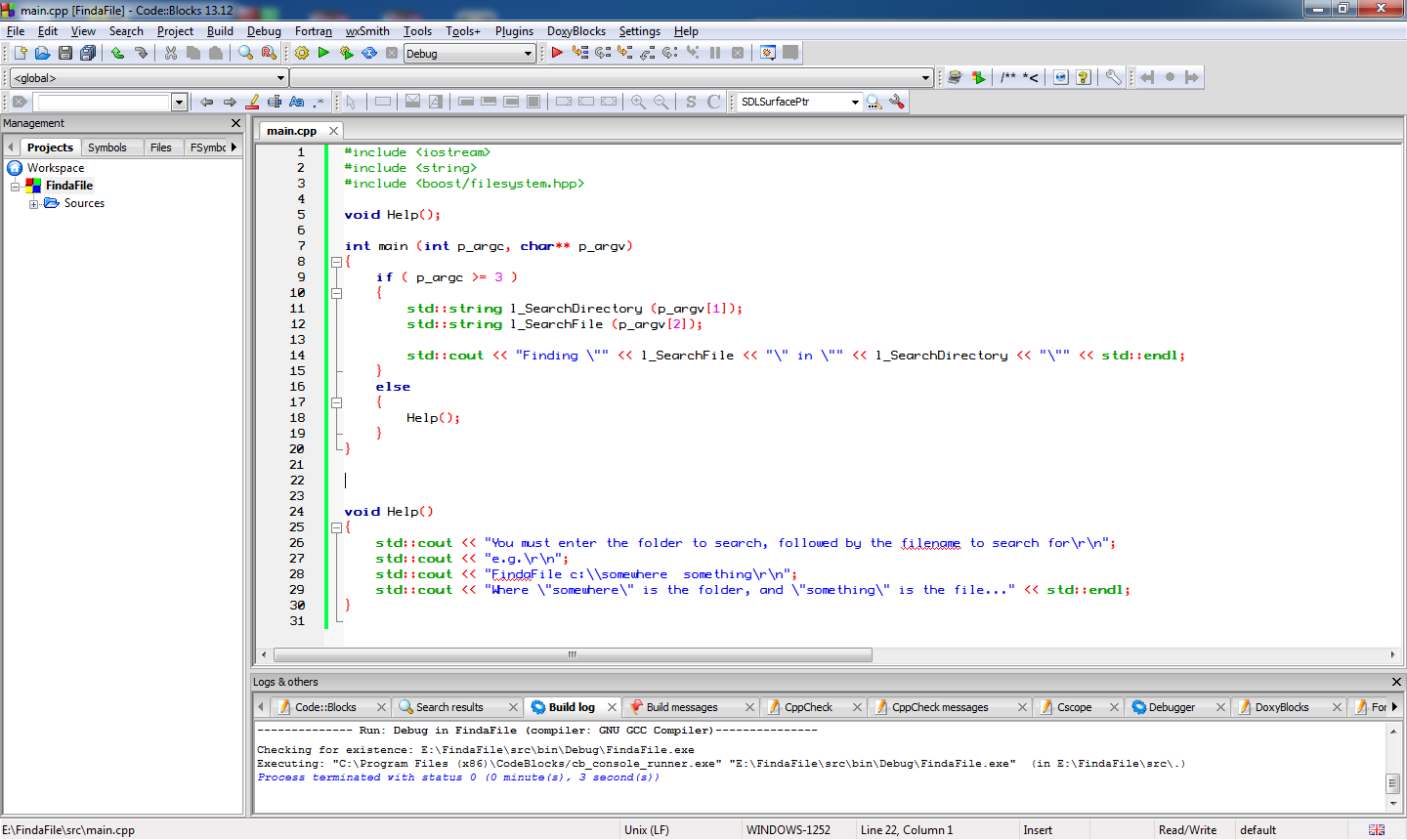
Lets write some code to take a directory to search and a file to search for at the command line and just output them, as a starting point....


We can go into "Project" on the menu to set the parameters for the program to some useful values... I have added a "Help" function already to point out when a mistake is made... I am going to just check my code by running it without parameters, then with bad parameters and finally with a valid folder name & filename... The targets I am using is "C:\Code" a folder I know exists, and "Program.cs" to look for all the program C# files I have in that folder...

Lets see our program output at this point...


Our first calls to the boost library now are going to turn the search directory string into a path, which is easier to work with in the boost library, you don't have to perform this step most all the boost filesystem library functions will automatically cast strings or cstrings or wstrings you pass to them into boost::filesystem::path or wpath instances on the fly, however, it's in the long run quicker for your code if you convert them into paths once, rather than have the library create and throw away instances of paths over and over as you do various calls.

We will also need to check that the search directory is indeed a directory to start off from...


Next we need to iterate through the directory and for each file check if its name is a match... I am going to put this into a function straight away, so we can call  into the function whenever we meet a sub-folder we can automatically queue if for searching as well....


And the code for this Search Function looks like this:

void SearchDirectory(const boost::filesystem::path& p_Directory, const std::string& p_Filename)
{
    std::cout << "Searching [" << p_Directory << "]...\r\n";
    std::cout.flush();


    auto l_Iterator = boost::filesystem::directory_iterator (p_Directory);

    // A blank iterator is the "end" point

    auto l_End = boost::filesystem::directory_iterator();           


    for ( ; l_Iterator != l_End; ++l_Iterator)

    {
        // This is the type "boost::filesystem::directory_entry"
        auto l_DirectoryEntry = (*l_Iterator);  


        // Look for subdirectories, files or errors....

        if ( boost::filesystem::is_directory(l_DirectoryEntry) )
        {
            // Recurse down into the sub tree
            SearchDirectory(l_DirectoryEntry, p_Filename);
        }
        else if ( boost::filesystem::is_regular_file(l_DirectoryEntry) )
        {
            std::cout << "Found File... [" 
                << l_DirectoryEntry.path().string() << "]\r\n";


            // We need to just have


            // Regular files are NOT symlinks, or short cuts etc...

            // So we look for a match!
            if ( l_DirectoryEntry.path().filename().string() == p_Filename )
            {
                // Notice here that we call to get a "path"
                // and then a "string" from that path!
                std::cout << "!!!! Match Found [" 
                     << l_DirectoryEntry.path().string() << "] !!!\r\n";
            }
        }
        else
        {
            // Unknown directory or file type
            std::cout << "Error, unknown directory entry type\r\n";
        }
    }


    std::cout.flush();

}

You will notice we receive a "directory_entry" from the "directory_iterator", then we get the "path" out of that, and finally the "filename" from that path... We can output any of them along the way, but we only compare the filename with the search pattern.

If the "directory_entry" was found to be a directory itself we simply recurse into another search.

This code now works....


This completes this little tutorial, if you found it of some use, please follow the blog, if you really really liked it and want to help me develop more ideas, or suggest more ideas, the donate button and e-mail link are at the top right!

Good Luck!

Wednesday, 7 September 2016

Software Engineering : Building Cryptozoidberg (Boolberry)

I recently received a request via YouTube to help a fellow programmer out, they were having issues building this library against the boost libraries... https://github.com/cryptozoidberg/boolberry

The problem essentially is the lack of transparency in CMake when it looks for boost with it's "FindBoost" functionality, because neither he, nor I build boost with CMake.  I personally don't use or like CMake, I do use make however, and am happy to look around in the make files.

So, I did... And there's nothing specifically wrong with this makefile, but it is insisting on looking for boost within the system, not the version built by yourself.

My Solution therefore has been:

sudo apt-get install libboost-all-dev
sudo apt-get install git
sudo apt-get install cmake
cd ~
mkdir c++
cd c++
git clone //https://github.com/cryptozoidberg/boolberry.git
cd boolberry
make -j4

(Note, replace 4 here with as many cores as your PC has available!  More cores will speed this build up, and it will take a long while)

And this works fine:


As you can see.  However, I did this from my main build machine, which has a whole bunch of additional and historic settings.  Which is the most common pitfall for others coming to build your software later, they lack these customisation's.

My build environment: Ubuntu 16.04 Desktop, with the i3 Window Manager (just open a terminal), and I have installed gcc (sudo apt-get install gcc).  These are the only steps before running the above script in a terminal window.

I therefore decided to perform a full clean setup of this system in a new Ubuntu 16.04 (64bit) VMware Virtual machine.

From this, I realise I needed to explain how to install the boost libraries, how to set up cmake and how to get git working before the build would work....

You can see this whole process below, please accept my apologies that this was recorded on an extremely slow internet connection, it got smushed during recording over the mobile link, and I've not had chance to re-shoot or edit the video.


As you can see however, the build worked perfectly.

To Muhmad whom asked for this, you'll find the Donate page at the top right!

Thursday, 21 April 2016

C++: Boost Libraries, Code Documentation & Examples

I have a loving relationship with the Boost C++ libraries, but I have a real hate of their documentation, not just it's style, but the mistakes and fragmentation they build into it.

When I search for say "socket", I want it to take me to boost::asio::tcp::ip::socket.  But instead it takes me on a run around, and when I finally get to boost::asio::tcp::ip::socket the examples and namespace being used is incomplete, it assumes a bunch of things, and you get told to look in tcp::ip::socket.

This is fine, if your reader knows to assume boost::asio as well, but if you're new to the whole boost project, you don't know sockets live in asio, you might be looking for boost::net, or boost::networking, or boost::network or just boost::tcp.  And you're stuck, lost, you have to leave the boost documentation search and go to google.

To fundamentally have to leave the documentation of an actual project website, and use a third party in this way is fundamentally telling you your documentation is flawed.

Then, there are mistakes in the documentation, this is annoying, but when the mistakes are in the examples given it's unforgivable, you're basically giving your users the finger, because not only are you teasing them with an example, but when it doesn't work they are again cast out into the wilds of the internet.

Case in point, again the socket, it's example code shows it as "soocket".  A typo yes, but it tells me two things, first of all, the code was not proof read, and second; and perhaps most importantly; the examples are not from working code, they've never been run, because it's not soocket, and the compiler would instantly tell anyone trying to run that code soocket is invalid.  Examples SHOULD ALWAYS BE LIFTED FROM A WORKING EXAMPLE!

Wednesday, 7 January 2015

Programming - Elite Dangerous Tools - Market Data

Update: You can now support this project at Patreon!

I've been working on the image stitching & capturing, especially monitoring the keyboard from my program, whilst in the game.  So now I can capture a region of the game client window on command.

Once I've captured the different parts of the Market Data (Commodities) screen.... I can stitch them together.

Lets take a look at the pieces and then the result....


Now, each piece is manually captured upon a key press, and then once I know I have enough pieces I manually kick off the stitch... This is the result.


I can now at least store this as the market data for that station, however, this is not perfect.  I do have to ensure I don't highlight anything and I do scroll down manually and take each image.

The next step is going to be to name this resultant image for the source station, date & time it, and then process it further, which takes us back to the Grey Scaling and Sobel processing, finally to pass them into OpenCV or whatever I end up with to optically process the data from the image.

Here are some other pages captured, which have been put together from various stations...


Monday, 20 January 2014

C++ Integer to std::string conversion speed

There is often a lot of discussion about the most efficient way to convert things in C++, personally I like the boost::lexical_cast, I find it gives clear and readable code; very important in the systems I write, especially for maintenance and up keep.

However, many assume it to be slow, indeed most authors on the topic turn almost immediately to C for the fastest way to convert integers to strings, and unfortunately I find the same is true, even with std::string and std::ostringstream features the old sprintf tends to be faster.

But, crippling many users of std::string is their lack of understanding of that standard library staple class, so here is my little investigation into the speed of conversion, using a mix of C and standard C++, to give you a good idea of how fast things can be, and how to use your standard class and its memory to best effect.

The first trick you will see in this is the use of the std::string as a memory buffer, you can do this by declaring your standard string, then resizing it...

std::string MyName;
MyName.resize(12);

The memory location now at &MyName[0] points to 12 empty characters for you to use just as you would a char* or &char[], useful to stop using uncontrolled char* buffers left right and center, and perhaps the least used "tip" I can give when using std::string.

So, what conversions do we have?...

class Conversions
{
    public:

        static const std::string IntToString(const int& p_Input);

        static const std::string IntToString2(const int& p_Input);

        static const std::string IntToString3(const int& p_Input);

        static const char* IntToString4(const int& p_Input);

        static const void TestConversions (const int& p_Cycles);

};

The first three are going to be using whatever code to always give a pre-allocated std::string, the fourth conversion is going to return a raw char*, so the programmer has to delete the result etc, or rick a memory leak.

I still want that fourth result to be a std::string however, and I'm not going to worry about the leaking memory, so though the function performs a new[] I will not perform a delete[], but simply will assign the char* to a new std::string upon return.  Making the timings taken fairer.

So, lets look at the program code for each of the functions, and the timing in the test function.  I'm going to use boost::posix_time for the timings here:

const std::string Conversions::IntToString(const int& p_Input)
{
    std::string l_buffer;
    l_buffer.resize(33);
    sprintf(&l_buffer[0], "%d", p_Input);
    return l_buffer;
}

Above we can see the first function, using our string resizing tip, we resize the string as a buffer to take up to 33 characters (the maximum size for a 32bit integer is 33 characters) and then we use the old fashioned sprintf from the cstdlib header.  Many claim this to be the fastest, the defacto conversion, even more so than using itoa.

const std::string Conversions::IntToString2(const int& p_Input)
{
    std::ostringstream l_oss;
    l_oss << p_Input;
    return l_oss.str();
}

Next is the standard library way of working, we create a new ostringstream and stream the integer into it, then return the std::string from the stream.  I believe this to be pretty slow, my mind tells me that the creation of the stream and then the extraction of the result is going to be slow; but we shall see in a moment.

const std::string Conversions::IntToString3(const int& p_Input)
{
    char l_buffer[33];
    sprintf(l_buffer, "%d", p_Input);
    return std::string (l_buffer);
}

Next we have another use of sprintf, however, this time we're not resizing a string natively, we're creating a character string and then casting it back as a result.  I think this may be the fastest, but again we shall see.

const char* Conversions::IntToString4(const int& p_Input)
{
    char* l_buffer = new char[33];
    sprintf(l_buffer, "%d", p_Input);
    return l_buffer;
}

Finally, very similar to the third test, this conversion creates a new character array pointer as the buffer, and then uses sprintf.  This is going to leak memory if we don't delete[], but I'm ignoring that for now and just testing the speed.

Now onto the conversion test function, the basic layout is, take the start time before the conversion, call the conversion a lot of times assigning the result to a std::string locally, and then take the time after and output the difference in milliseconds...

Now, the speed of this code in C++ is going to be fast in all cases, so we need enough sample calls to get a reading... I'm settling on 30 million calls, 30000000.

const void Conversions::TestConversions (const int& p_Cycles)
{
    // Test 1
    std::cout << "Test 1...";
    boost::posix_time::ptime l_end;
    boost::posix_time::ptime l_start (boost::posix_time::second_clock::local_time());
    std::string l_result;
    for (int i = 0; i < p_Cycles; ++i)
    {
        l_result = IntToString(i);
    }
    l_end = boost::posix_time::second_clock::local_time();
    boost::posix_time::time_duration l_diff = l_end - l_start;
    std::cout << l_diff.total_milliseconds() << std::endl;

    // Test 2
    std::cout << "Test 2...";
    l_start = boost::posix_time::second_clock::local_time();
    for (int i = 0; i < p_Cycles; ++i)
    {
        l_result = IntToString2(i);
    }
    l_end = boost::posix_time::second_clock::local_time();
    l_diff = l_end - l_start;
    std::cout << l_diff.total_milliseconds() << std::endl;

    // Test 3
    std::cout << "Test 3...";
    l_start = boost::posix_time::second_clock::local_time();
    for (int i = 0; i < p_Cycles; ++i)
    {
        l_result = IntToString3(i);
    }
    l_end = boost::posix_time::second_clock::local_time();
    l_diff = l_end - l_start;
    std::cout << l_diff.total_milliseconds() << std::endl;

    // Test 4
    std::cout << "Test 4...";
    l_start = boost::posix_time::second_clock::local_time();
    for (int i = 0; i < p_Cycles; ++i)
    {
        l_result = IntToString4(i);
    }
    l_end = boost::posix_time::second_clock::local_time();
    l_diff = l_end - l_start;
    std::cout << l_diff.total_milliseconds() << std::endl;
}

Lets see what our output is:

Test1...6000
Test2...17000
Test3...5000
Test4...6000

Immediately we can see my hunch about using the string stream is correct, its very much slower, more than twice as slow.

Surprisingly, at least to most readers - one hopes - we can see that the string::resize and use of sprintf is very close to the other uses of sprintf.

Since sprintf should be taking a constant amount of time what we've timed in tests 1, 3 and 4 is the speed of our memory management, how quickly has the function made the result available.

Some readers maybe screaming at me to use itoa, and one could do that with a char buffer, or even a resized string, thus:

std::string buffer;
buffer.resize(33);
itoa (&buffer[0], p_Input, 10);

However, itoa is not a standard function and some compilers don't supply it, therefore you must generally always use the lowest common denominator and sprintf is just that.

There is also one last avenue, the lexical cast...

// Test 5
std::cout << "Test 5...";
l_start = boost::posix_time::second_clock::local_time();
for (int i = 0; i < p_Cycles; ++i)
{
    l_result = boost::lexical_cast<int>(i);
}
l_end = boost::posix_time::second_clock::local_time();
l_diff = l_end - l_start;
std::cout << l_diff.total_milliseconds() << std::endl;

Now, this approach should take into account the "bad_lexical_cast" exception, but exception handling is slow so we're ignoring that at this juncture.  And assuming we have a known data source (int i) which we have in a valid range.

Our test results how are similar for the original calls...

Test 1...6000
Test 2...17000
Test 3...5000
Test 4...5850

The new fifth test...

Test 5...1000

This is very much quicker than any of the other solutions proposed...

So, there you go...

#include <boost/lexical_cast.hpp>
#include <boost/date_time/local_time/local_time.hpp>
#include <string>
#include <iostream>

int main ()
{
// Test 5
std::cout << "Test 5...";
boost::posix_time::ptime l_start =
boost::posix_time::second_clock::local_time();
for (int i = 0; i < p_Cycles; ++i)
{
l_result = boost::lexical_cast<int>(i);
}
boost::posix_time::ptime l_end = 
boost::posix_time::second_clock::local_time();
boost::posix_time::time_duration l_diff = l_end - l_start;
std::cout << l_diff.total_milliseconds() << std::endl;

return 0;
}

Use lexical cast...

And about the exception handling, be smart the speed of this code is not affected by making the function throw the exception up, or by making the whole loop handle the exception once, be smart... and stop mucking about with conversions in C, you're only fooling yourself they're faster than other options.