Showing posts with label source. Show all posts

Wednesday, 30 August 2023

tBs - My First Clan

Today I want to regale you with a story of my past gaming glory, before Eve... before WoW... Back in the days of 2002 I joined a clan.... Now, I've read Ready Player One over and over, I do not get this whole "I don't clan" ethos in that writing because back then being in a Clan was the thing.

Guilds and corps in my later gaming life are very different things, this clan was cut throat.  We were

{tBs}

The Butchers

This is where I met my long time co-killer Chaplain (wave, hi chap!) for we were together the scourge of Avalanche.


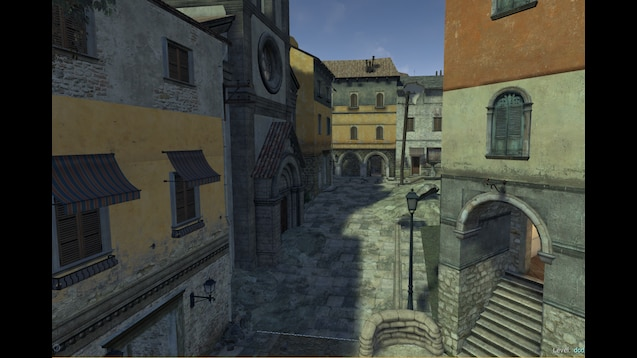
This is in the Half Life engine mod "Day of Defeat", and it didn't look this good (this is from the later Source version); all important in this game play was the tick rate of the server, most serious clans hosted their own servers and they tweaked them to the max.

I remember our server admin was a chap called Twister, but that's about all, he never much liked any input about the status of the server.  He didn't play very often, so it was always quite curious that us experienced players were not welcomed into giving him feed back; let me tell you as a now professional game developer and server administrator listen to your expert users, they will know when things are off, they may speculate, but they will know and help you spot issues up front they're a resource, use them, never dismiss them.


Anyway tBs were well known, playing on the European Enemy Down ladder we were very often top 10 in Europe, one time top three, playing on again off again matches against the other members of the ladder; we were effectively the second most active clan behind "Scotlands Finest Highlanders" or SFH.

At one time I myself organised our own "Butchers League" and for four weeks in the summer of 2003 I ran the website and helped organise five guest teams to play pre-arranged matches in a knock-out for the win.  SFH won.  Yes, SFH won the tBs League.  That was fine.

What wasn't fine was the reaction of another clan OAP or "Old Aged Players" they kicked off big time, they could not connect their players to the server; they didn't do any preparation up front and get really really angry, really for no reason, when they were disqualified from a match they simply could not raise five players to compete in.  They were offered a different match slot, but they even turned up to that with only four players and a bad attitude.

Within tBs ourselves there were a bunch of interesting characters, but lets talk more about the game.

Day of Defeat

I loved that game, or mod, my favourite map was Avalanche, a wholly unfair map for the allied side (and yes, I admit I enjoyed playing the German side more) but Chaplain and I were demons of the Church.

The Church, pictured above sat on the flank of the map, entered via the smashed bell tower at the top or the rubble strewn wall at the bottom, the actual doors were closed.  Inside you had two side by side, but slightly offset rooms on the ground, then rubble streaming up to a mezzanine level, with then either the option to climb a ladder to the exposed but dominating tower top, or to carry on up and through a wall to the tiled rooves beyond.

As an axis player you began from the top side, coming into the church via the tower.

As an allied player you began on the ground and were forced up through the rubble.

Defending that tunnel route was critical to holding the map, you controlled access to the opposite side for the allied players, you pinned them in their spawn.

Or you held the tower and dominated the center.

It was probably not well thought-out in design terms, but it was such a wonderful piece of level spacing I loved it.

My best memory came playing another clan, we as axis and they as allies.  For some ungodly reason they had a machine gunner run right up into my door way... and it was my door way, I had gone from spawn, swept over the roof into the church and down in sprint fashion time.  This guy thought he could take my church and lay MG fire on my team from my church tower?!  Nope.  A burst of MP40 and he was down, but do was his MG.

Now it was not often ever we took the MG to the church, it wasn't practical in the close-quarters environment SMG was the usual call to arms.  But this day I could not resist, I lay in the rubble pounding their own MG fire down on them.  Their only hope to remove me was to pre-cook a grenade and time it perfectly to explode in my face.  They did not do this; my score was astronomical with chaplain bringing me a reload of ammo and they throwing himself into fire to respawn and bring me yet more.

That was our church on Avalanche.

A few other maps floated our boat, but were were just so good at that map, specialist even that when we played on open public servers we were often accused of cheating, being so good someone is convinced you are cheating is just the ultimate thrill.  I've only managed it through good strong team work.

The other tBs characters though:

Weeman - constantly threatening to self-harm, a disturbed kid to say the least.
Hopper - Cheating chap, he blanked chaplain and I after botting in WoW (and obviously so) undermining any respect we had for this "skills".
Remus - an older guy, interesting fellow to talk to.
Twister - the hard put server admin, who didn't want to know really about our issues.
Dodi - a nice lad who came and went.
Mako - Not the shark he thought he was.
and of course "The Butcher" himself, Butcher being his surname... Always in charge, but never there.

I learned a lot from this, my first clan, I learned about team work, about trusting others and appointing them correctly and appropriately, all from a computer game, backed up with my martial experience in karate I believe I'm quite rounded in letting people both prove and earn their reward and garnering them with praise for a job well done; whilst also being even handed.

All experience for a computer game, and they call is a game; well, isn't life just one big game too?


Monday, 8 June 2020

The Worst (or maybe second worst) Source Control Ever

I've not made a bit deal out of this, but I like source control systems, I like git, I even like subversion, I like when folks even take the time to zip up the whole project tree and stick it on a whole other machine.  All are different source control strategies, each have their place.

What doesn't have a place in my opinion is poor implementations of this... such as... When there is no source control, that folks "remember" how the code was and can work back to where it was when things go wry.

Because inevitably they can't remember.  Solutions, subtly and satisfaction with what was present can easily be lost.  And in such situations you can only blame yourself for not having a back up of the original or yesterdays or whatever.

So it was as part of the tyrannical "lead" of one developer I came to meet the worst source control system ever, it was based on floppy disks, had no back up and was a manual process.

And it starts with an initial checkout, to a CD-R.

The CD-R was known as the "master" disc, and it contained a set of the SQL scripts to build an instance of the database, a series of sequential updates which each quarter were compacted down and made into one new "CREATE DATABASE/TABLE" thing.

Then there was an auxiliary folder with a bunch of tools which you copied to your hard drive and used.

And finally there was the source tree, you installed Microsoft Visual C++ 6 and opened the project and built the code.

You then ran a tool and put a floppy disk in, this disk was used as a swap between you and the lead developer at the end of the day, so a nightly build could be carried out (or a morning build on a Monday after a weekend) on a slightly more powerful machine.

As a developer then you had you IDE, this background tool running and you worked as you normally would.

Every time you would save in the IDE the tool saw the change in date of the source code file blatting that file onto the floppy.  The whole file, overwriting the old, not a delta, not a diffable solution, it just progressed forwards only.

You could not revert, not compare, not really do anything we take for granted in modern development.

This was a bad system.

The bad became worse when there was a delay between the save & the tool picking up, and then a floppy disk took time to write ( a lot of time ) and it was soon realized whilst it was writing the file from the HDD to the floppy it locked the file, so you couldn't write another copy of the file whilst this slow write was in progress.

As such lots of developers didn't run the tool, they would run it once at the end of the day, or just copy all the files listed as date/time changed to the floppy manually.

This floppy was then the feedback of all changes to the lead, in charge of merging the changes... Well I say merge, what happened was the mainline version was simply over written with whatever the developer handed over.  They were meant to qualify their code was coo, they were meant to run the tool which performed the copy.

So all the pieces were on the board and check-mate was one move away.

For the worst moment came on one particular Friday, a developer was toiling on tidy up duties, those little tasks you put off until the end of a day to fill time until you can go home, his task this day at 5:03pm was to correct two typo's in a file, one higher up and one lower down.

Just spelling mistakes, no need to recompile that, taking an hour, on a Friday with the pub and a takeaway calling.

So the chap performed his save, saw the light come on the disk and then did the second correction, hit save, the floppy light went off... and he turned his machine off... just dead off... pulled the floppy and dropping it into the "merge tray" on the leads desk started his weekend.

I walked into this on the Monday morning at 8am, as a very junior developer, the managers were all present, the lead was present, two senior devs were pawing over floppy disks in no discernible order.

For it turned out that the tool had started to overwrite the second save of the file, it had gotten so far through the write when the power had been pulled.  The original was lost on the developers machine for he had pulled the power... rather than shutting down.

And this source control system only went forwards, you could never ever regress.

The seniors were trying to build a delta list of each change for the last month, back to the start of the last CD-R... From floppies which had been used and reused, they had to manually inspect the changes between the file in question in the floppies.

If the copy they had was deemed to be older the disk was put aside.

If younger the file was copied into a directory to slowly try and catch the code up.

Around 10am the developer responsible wondered in, listened to the complaints, listened to everyone being exacerbated and then without a blink of irony said "Told you this wasn't source control".

Fabulous...


The worse Source Control ever?... Perforce... Hands down, Perforce.

Friday, 22 March 2019

P4

I don't like P4


Its not the best blog post after a fortnights silence, but it's all I have to say really.

Thursday, 19 July 2018

C++ : Copy Constructor versus Ignorance

I've spent a bit of time reviewing someone else's code recently and I've come to an impasse with them, so they have a lot of code which will take some standard container, and the code doesn't just initialise the local copy from the passed in reference... No it'll iterate over the list of elements adding them to the class version.

I have picked fault with this, it's not RAII, it looks ugly and if you're threading you can create your class instance and the member is empty or in a partially filled state before the loop within the constructor is finished... I highlight this in red below...

My solution?  Just initialise the member from the reference - see the green highlight in the code below.

My results from the timing below?


These times are "microseconds" so tiny... But with just constructing from the existing reference we always get a lower time, quicker code...


Running this test 30,000 times, trying it in different orders and with maps of upto 1000 elements I had a rough average increase of 60% speed by using the copy constructor of std::map rather than reallocating new memory for each pre-existing element.

I wanted therefore to understand the reasoning behind the original code, was there some reason to perform a clone (alloc and assign new instance) operation for each pair in the map being passed in?  Looking at the code there was no apparent reason, so I spoke to the developer, asking why they had performed the construction in this manner... Their reply...

"That's how you initialise a container"

You can load up a container in this manner, but you already have the contents of the map, you're just copying it... "Why don't you use the copy constructor?"... I asked...

"I didn't write one"

Hmm, "You don't, the compiler generates it for you, std::map has its own copy constructor".  Use the copy constructor folks, trust me.


#include <map>
#include <chrono>
#include <string>
#include <iostream>


using Mapping = std::map<int, int>;

class A
{
private:
Mapping m_TheMapping;

public:

A() = delete;
A(const A&) = delete;
void operator=(const A&) = delete;

A(const Mapping& p_Mapping)
:
m_TheMapping(p_Mapping)
{
}

A(const Mapping& p_Mapping, const bool& p_Other)
:
m_TheMapping()
{
for (auto i : p_Mapping)
{
m_TheMapping.emplace(i);
}
}

inline Mapping& Mapping()
{
return m_TheMapping;
}
};


int main()
{
Mapping l_m
{
{ 0, 0 },
{ 1, 1 },
{ 2, 2 },
{ 3, 3 }
};

auto l_time(std::chrono::high_resolution_clock::now());
// Copy Construction
A l_map(l_m);
auto l_timeB(std::chrono::high_resolution_clock::now());

auto l_Dur(l_timeB - l_time);
std::cout << std::chrono::duration_cast<std::chrono::microseconds>(l_Dur).count() << std::endl;


auto l_time2(std::chrono::high_resolution_clock::now());
// Clone Construction
A l_map2(l_m, true);
auto l_time2B(std::chrono::high_resolution_clock::now());

auto l_DurB(l_time2B - l_time2);
std::cout << std::chrono::duration_cast<std::chrono::microseconds>(l_DurB).count() << std::endl;
}

Tuesday, 22 May 2018

Introduction to C++ : Starting C++ Series Part 1

A few of you maybe aware of the book on Python I wrote, and published, last year?  And I've had at least one reader get in touch for a second part.  Unfortunately my gaze has passed over Python and returned to where I live.  The world of C++.

I have a particular problem with the C++ developers I'm meeting of late, they're either simply not C++ programmers, being an actual mix of good and bad C programmers or just not programmers at all (in one case).  Then even when they are very good C Programmers, there's been a mix of the up-take on ideas and feature benefits of modern C++ itself.

Its to and for these fair folk I have begun to write about C++, a new book, based on my own real experience but tempered with where I believe teams and individuals are going wrong when converting their skills to modern C++.

For the programmers reading here now, it starts with a chapter zero... Lets take a sneak-peek....


Chapter 0: Introducing C++

It is incredibly hard to introduce the C++ programming language without at least the most cursory glance at its direct predecessor C. C was created by Dennis Ritchie whilst at Bell Labs sometime between 1969 and 1973, in 1978 Dennis co-authored a book, the book, on the C Languages with Brian Kernighan. Together known as K&R, Kernighan and Richie's book was a great success,
spreading C into being, arguably, the most widely used programming language at the time, and still in that top ten league today.

The success of this first publication, its relative low price of entry into the fast developing world of C for an ever growing number of different machines, really did set C as the language to learn for a very long time.

"C has all the basic elements for expressing computation, it has iterations, it has data types, it has functions and that's it. It doesn't get into the game of expressing abstractions" - Bjarne Stroustrup.

So the world was until 1980, when a talented programmer by the name of Bjarne Stroustrup;  working just down the hall from Brian Kernighan at AT&T began a project. He called it "C with Classes". Intended as a natural extension to C, it inherited a large part of the C language syntax as well as many of the mannerisms of C and general purpose computing from the late 1970's.

The concept of "C with Classes" was to furnish users of C with a way to allow the representation of abstractions, if one wanted to represent a car in code they could define something called a "Car", it could have internal values to represent it's speed, direction of travel, the fuel level, everything that we think of as a car could be expressed within a class. In C one has no such way to encapsulate such functionality with any form of familiarity.

Certainly in C you can have a set of variables which represent the exact same things, you can name them to have a meaning of "fuel level", however they are not within anything known as a "Car" you as the programmer has to remember where all these values are, what they are called you have no easy of recall to get back to the values you are using, the concept of a class (what today we also call an object) was one of the major drivers behind the work being carried out.

The name however, "C with Classes" was not as succinct as one might desire, and indeed a friend of Stroustrup suggest he change the name of the language to C++, as the "++" function literally means to add one, an increment. The new language is an increment over the old.

Since then C++ has been ever evolving, in 1998 the first standard version of C++ was codified, from pre-existing attempts to unify the language by both specific vendors of tools for the language (such as Borland, Microsoft or Lattice) and industry bodies (such as ANSI). Published as ISO/IEC 14882:1998 by an ISO working group, C++98 drove home that C++ was at last truly diverged from C. A language in its own right, and something which had to be thought about differently.

I myself started to learn C++ in 1996, the difference in the community before the 1998 standard and afterwards was palpable, since then four other standard have been released. 2003 brought C++03, 2011 brought a working set of revisions ultimately called C++11, but also known as C++0x (due to the new standard taking so long to finalised, it was drafted and promised many times between 2004 and 2009 hence "0x). 2014 saw a further release as C++14, then 2017 saw C++17. The next revision is slated for 2020, it's name is yet to be decided, though good money could be placed on C++20.

From this release schedule we can see the acceleration curve, the faster and faster pace at which C++ has and is diverging from it's roots in C. It has matured, expanded and at each new update become more inclusive of functionality based on abstractions.

Today you can pick up modern C++ and it contains much more than the sum of its parts, you can express everything you could in 1978 in C, but so very much more.

Unfortunately, this success in expanding it's expressive nature, incorporating ever more abstractions and structures from computing, and every-day life, is tainted with some sadness, for as much as C++ strives and drives and builds every upwards, forever it has this seemingly unbreakable umbilical back to C.

You can pick up any C++ compiler from any vendor today, on pretty much any platform, and input a huge swathe of code written not in C++, but still written in C. You can elect to put this very book down right now, pick up a copy of the same book published by Kernigham and Richie in 1978 and produce code which works and work-ably solves some parts of the computational challenges you
face.

However, none of that code will be expressed in the powerful, elegant, I think beautifully powerful manner in which C++ allows you to. Abstraction, encapsulation, expressive representation of the real world in code in a manner which betters your understanding of the topic (as the programmer) but also allows others, non-programmers, to comprehend the devil within the detail of programming a modern computer.

Saturday, 16 December 2017

C++ : The unrandom random number...

I've been working in some C++, with boost to be precise, the machine I'm working towards finally has a processor with SSE3 in it, and so I've been to revisit the GUID generation code, boost specifies a couple of defines you can set up before incluiding the uuids header to help...

#include <iostream>
#ifndef BOOST_UUID_USE_SSE3
#define BOOST_UUID_USE_SSE3
#endif
#include <boost/uuid/uuid.hpp>
#include <boost/uuid/uuid_io.hpp>
#include <boost/uuid/uuid_generators.hpp>
#include <boost/lexical_cast.hpp>

const std::string GetGuid();

int main ()
{
for (unsigned int i(0);
i < 100000;
++i)
{
std::cout << GetGuid() << "\r\n";
}
}


const std::string GetGuid()
{
boost::uuids::uuid l_guid =
boost::uuids::random_generator()();
return boost::lexical_cast<std::string>(l_guid);
}

This code looks fairly innocuous, "GetGuid" is the key part, you may argue that you're always setting the random number generator up, each and every call, but the output is fairly simple, this is only a test....


However, if we look carefully, there is always one column the same, when running on the screen this is very obvious...


Generating hundreds of thousands, taking minutes and minutes hasn't changed that one character.

Why this is isn't clear to me, I need to do some more digging.  I'm going to hazzard a guess it's that we construct and release the number generator each pass, we should perhaps instantiate one and keep it, so the sequence of randomness is preserved.

Any suggestions?  Hit the comments below!


P.S. Yes, I know I've not used RAII with the l_guid assignment there, but I'm in a hurry and only just noticed.

Monday, 19 December 2016

Programming : Using Boost File System Directory Iterator to Find a File

PLEASE NOTE, THIS POST CONTAINS UPDATES TO PREVIOUS POSTS - BOOST 1.62.0 NO LONGER TAKES THE "MinGW" DIRECTIVE, TO USE MINGW YOU NOW ONLY NEED PASS THE "GCC" DIRECTIVE; see section 5.2.2 at this link...

Today I'm going to do some code, this is a code example with Code::Blocks using the Mingw compiler on Windows, to build the boost libraries and then use the boost.filesytem library to find a specific file from a given root, first just looking in that directory at all its files and the finally making it recurse down the tree of files.

First things first, lets create a folder to work in, I'm going to call it "FindaFile", inside this I'm going to create "ext" for external items, which is where I'll place & build boost; and I'll create "src" for source which is where our project file & source code will reside... Lets get started...

Next...


Extract the boost library, I happen to be using 1.62.0, which is the current version at the time of writing... And I then need a command prompt which knows the location of the compiler for mingw (i.e. we've added it to the PATH environment variable)...


We're preparing to build boost with the mingw toolset...


And then performing the boost build, which on this machine is going to take a long time as I only have 2gb of RAM... Hit that donate button to help me improve some of my machines!


So the path was set, the bootstrap is performed:

bootstrap gcc

and then I start the build

b2 toolset=gcc


Once the build is complete the two folders we will be using in our code-blocks project are the "boost" folder within the boost_1_62_0 folder; this contains all the header files for the boost library.  Some of the libraries are header only, so just including this folder into your builds (on gcc with "-I /foldername/") is enough to use boost, items like "lexical_cast" are perfect examples of this.


The other folder is the "/stage/lib" folder, this will contain all the build library binary's.  When you are using the file system it is not a header-only library, you must link against the "boost_filesystem" library file, and this is where it will reside!

You can leave the boost build running and open Code::Blocks now...


And create a new project, with a little bit of normal code, to check everything is working & we have set it to use C++11 (I would like to use a newer C++, but I only have this old compiler installed)....


Now, lets set the build options in the project...


I am going to set C++11, all warnings and stop on fatal errors...


Then I am going to set the compiler to look in the boost folder for the headers...


And now we tell the linker were to look for the libraries....


Our final step is to tell our program to use the filesystem library, when doing this you also need to use the system library... So lets switch to the linker settings and insert those libraries...

Now, the file name we are going to add is:

libboost_system-mgw47-mt-d-1_62.a

Lets break this down, from left to right we are told the this is part of the boost library "libboost" that is is the "system" sub-library, that it was build with "mingw v4.7", that is it the multi-threaded library, that it is built "debug" and it came from boost v1.62... You need to know this, because in our previous pages you will see we ONLY set our search directories and settings for the "Debug" version of the project... When you switch to the clean, smaller, faster "Release" build you will need to set everything again!

We add this library then into the linker settings, within the link library section... We need to add this file and the filesystem file...


The IDE might ask you to add the library as a relative path, this is directly pointing to the file, and I personally do not advise this, as we've set up the "search directories" we need only enter the filename into the library list.

Now, once the boost build is completed in the background, we can use the boost file system library in our code, and check for the presence of a file....


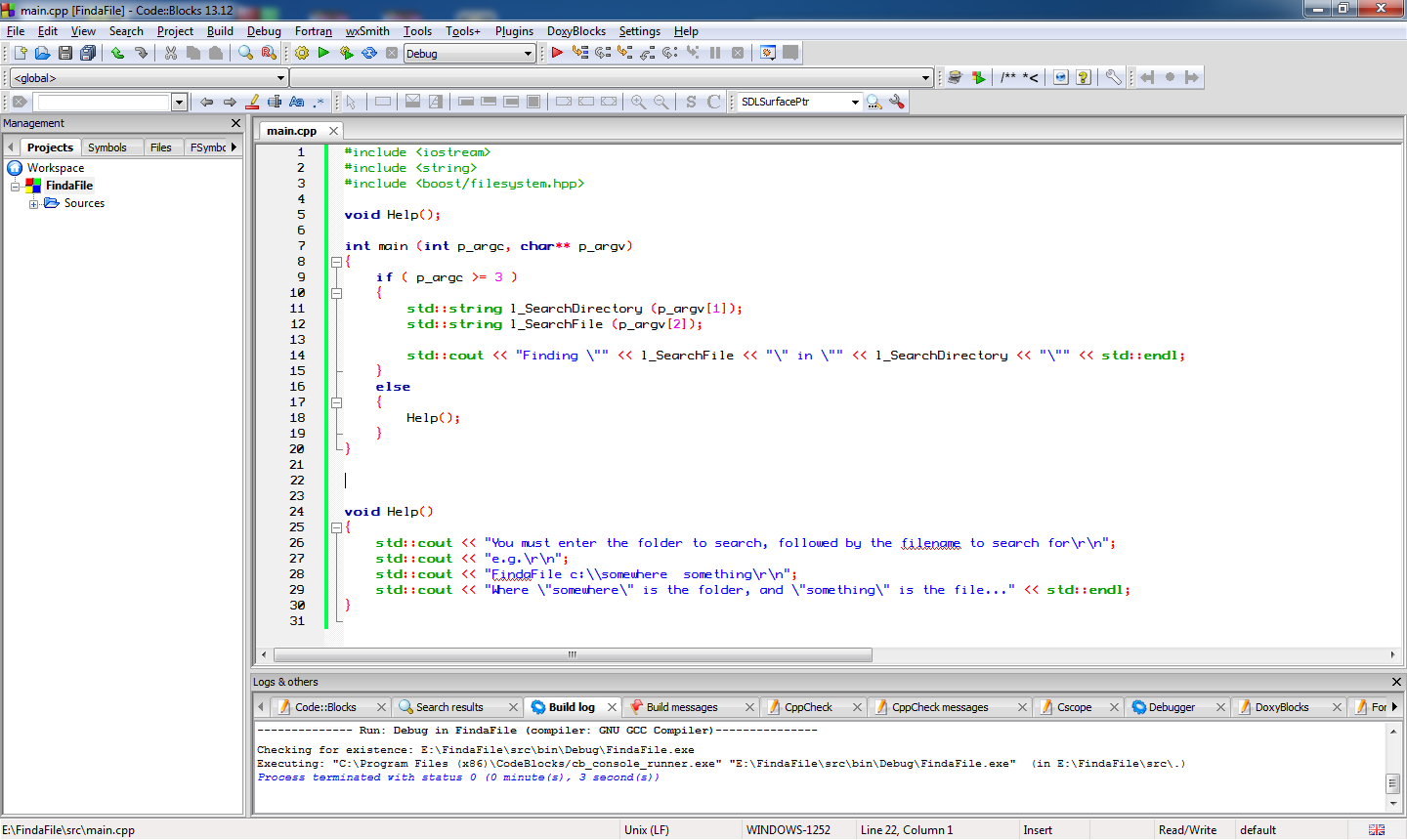
Lets write some code to take a directory to search and a file to search for at the command line and just output them, as a starting point....


We can go into "Project" on the menu to set the parameters for the program to some useful values... I have added a "Help" function already to point out when a mistake is made... I am going to just check my code by running it without parameters, then with bad parameters and finally with a valid folder name & filename... The targets I am using is "C:\Code" a folder I know exists, and "Program.cs" to look for all the program C# files I have in that folder...

Lets see our program output at this point...


Our first calls to the boost library now are going to turn the search directory string into a path, which is easier to work with in the boost library, you don't have to perform this step most all the boost filesystem library functions will automatically cast strings or cstrings or wstrings you pass to them into boost::filesystem::path or wpath instances on the fly, however, it's in the long run quicker for your code if you convert them into paths once, rather than have the library create and throw away instances of paths over and over as you do various calls.

We will also need to check that the search directory is indeed a directory to start off from...


Next we need to iterate through the directory and for each file check if its name is a match... I am going to put this into a function straight away, so we can call  into the function whenever we meet a sub-folder we can automatically queue if for searching as well....


And the code for this Search Function looks like this:

void SearchDirectory(const boost::filesystem::path& p_Directory, const std::string& p_Filename)
{
    std::cout << "Searching [" << p_Directory << "]...\r\n";
    std::cout.flush();


    auto l_Iterator = boost::filesystem::directory_iterator (p_Directory);

    // A blank iterator is the "end" point

    auto l_End = boost::filesystem::directory_iterator();           


    for ( ; l_Iterator != l_End; ++l_Iterator)

    {
        // This is the type "boost::filesystem::directory_entry"
        auto l_DirectoryEntry = (*l_Iterator);  


        // Look for subdirectories, files or errors....

        if ( boost::filesystem::is_directory(l_DirectoryEntry) )
        {
            // Recurse down into the sub tree
            SearchDirectory(l_DirectoryEntry, p_Filename);
        }
        else if ( boost::filesystem::is_regular_file(l_DirectoryEntry) )
        {
            std::cout << "Found File... [" 
                << l_DirectoryEntry.path().string() << "]\r\n";


            // We need to just have


            // Regular files are NOT symlinks, or short cuts etc...

            // So we look for a match!
            if ( l_DirectoryEntry.path().filename().string() == p_Filename )
            {
                // Notice here that we call to get a "path"
                // and then a "string" from that path!
                std::cout << "!!!! Match Found [" 
                     << l_DirectoryEntry.path().string() << "] !!!\r\n";
            }
        }
        else
        {
            // Unknown directory or file type
            std::cout << "Error, unknown directory entry type\r\n";
        }
    }


    std::cout.flush();

}

You will notice we receive a "directory_entry" from the "directory_iterator", then we get the "path" out of that, and finally the "filename" from that path... We can output any of them along the way, but we only compare the filename with the search pattern.

If the "directory_entry" was found to be a directory itself we simply recurse into another search.

This code now works....


This completes this little tutorial, if you found it of some use, please follow the blog, if you really really liked it and want to help me develop more ideas, or suggest more ideas, the donate button and e-mail link are at the top right!

Good Luck!