A blog about my rantings, including Games, Game Development, Gaming, Consoles, PC Gaming, Role Playing Games, People, Gaming tips & cheats, Game Programming and a plethora of other stuff.
This is a very hard post for me to write, not only am I personally and quite emotionally involved, but I am also still under a strict NDA and as such I can only point you to search the internet for many of the other leaks on the topic.
But finally I can perhaps explain why the number of blog posts I have been making has dried up; I often said it was because I was busy.
On January 2nd 2019 I walked into my first day of development on Project Blackbird as part of the core engine tech team with my employer The Multiplayer Group and as a founding member of the project with Zenimax Online.
The project as it stood the day it was cancelled was, is, stunning to look at. Alex Tardiff lead the standing up of a brand new renderer from the ground up, a brand new engine was also stood up along side this and the two interoperated superbly.
Early in the development we did a lot of research, selecting technology, containers and performance considerations; we stood up a project with a handful of people and scaled it sucessfully to hundreds. Standing up a new engine, a new renderer and the complete tooling stack for it is no mean feat. Think an almost skunkworks kind of deal, with just a dozen members standing up something like Unreal 4; then scaling it out to something which in my opinion visually looked better than Unreal 5, with all the tooling, all the content creation to roll out experience after experience coming together nicely... Within just over six and a half years!
The experience of playing was incredible, the mechanics in the game unique, the world in which the player experienced the game mezmerising.
The team was amazing, sure we had ups and downs, but we were one under the Blackbird banner and until 4:03pm Wednesday 2ny July 2025 we believed there would be a cornerstone gameplay experience delivered on PC, XBox and Playstation 5.... Alas, no more.
As you may understand I am extremely upset by these events, finding constant moments of almost grief, automated message reminders still appearing from headless accounts, sprint goals all planned out but no actions to make, I am bereft of purpose, I am emotional, I was a BLACKBIRD.
This post title might look mightily like the post I made in January it is related, but we're going to discuss a different part of my Entity Component System and that is the containers backing my type registration and the actual values stored per component.
I've seen a few different entity component systems and I'll draw parallels with a few well known public domain ones.
The first is EnTT, it uses the same principles as my system which are sparse sets to store the metadata in regards the components per entity, my implementation also uses sparse sets however inspecting their code repository file names alone you can see maybe three container types a dense set, a dense map and a table.
I have known maps used to point to vectors of stored components such that the entity handle or id is the index into the components it contains, and then all the other vector entries are nulls (or otherwise empty).
And then in yet other systems I have seen a fixed number of components (64) possible being represented by binary flagging or bitsets to indicate the presence (or absence) of a component on an entity, then a linear storage of each component in a fixef size array. This was a curious implementation, relying on Frozen to give constexpr & consteval Ecs ability to a certain extent at compile time.
My implementation started with the need to map the types (just any type) and then to allow those types to assigned to the entities, very much the sparse set model of EnTT and its cousins out there.
Why not just use EnTT? Well, where's the fun and understanding built out of that?
So where did I begin? Well, I began by just using a std::map, std::unordered_map and std::vector and a piece of hashing code to convert the type to a compile time evaluated id code; so I can for any type get a 64bit number which is its unique (or nearly unique) hash. I am not using RTTI and infact compile with this disabled for speed.
With my types mapped and components going into the entities and being able to see which types were assigned to an entity (see January's post) I set about looking at more specialised containers; and finally we reach the meat of this post... Or should I say Paper?
As my self-review, redesign and frank improvements began by the careful selection of the AVL Tree as my container of choice, a self balacing binary search tree, often lumped in with Red-Black trees. I had spent a little time in 2019 invaluating a red-black tree implementation for work for an ex-explorer, and watched on as a collegue did the same evaluation for my current. I had not been best impressed with the lob-sided effects in the former, and the latter went with an off the shelf implementation from EASTL.
My reading began with a few white papers, a couple of older text books, the STL guide and finally a read through the second edition of Grokking Algorithms by Aditya Bhargava.
This final read cemented the AVL Tree as my target container, and I set about implementation from the books examples.
My first addition was to include a visualization pass outputting .DOT format diagrams for passing through GraphViz... And so it was the first output, inserting an "A" into a new tree appeared:
I find
these tree diagrams most full-filling, and had to research the trick to
lay the diagrams out as an actual tree like this, but soon I had test
cases galore.
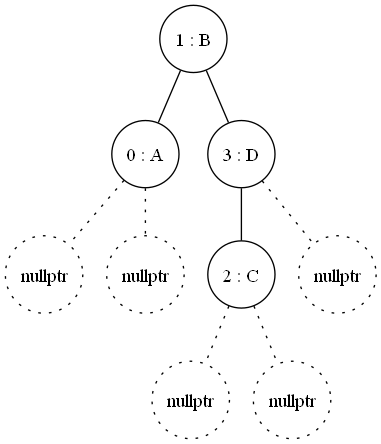
Inserting a second item and then a third, where we see the tree rebalance itself:
This rebalancing is the strength, I can take all the inserts of new types at the start up and then balance once; cost once, to get much faster look up than hashing every time and traversion a tree.
If you can't spot the re-balancing in the leaves, just watch for the root changing, once it does take all the left arms to find the lowest level index (zero) containing 'A' and then march parent, right, common parent and so on and so forth.
My code to flatten and allow this traveral is not very optimal, it can only really allow you to pre-allocate the correct number of keys to then follow. But again if the structure is not changing often (which is it now with type registrations) then it becomes the most optimal runtime solution I found.
Only the Frozen in compile time version, with its inherant more complex compile & lack of debuggabilty was faster. But then anything you can pre-compute is going to be faster.
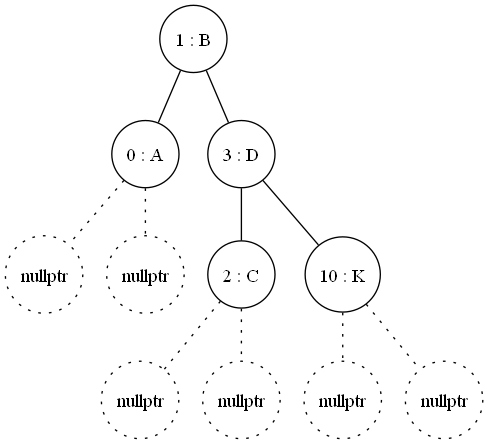
I did however find an edge case, depending on the order of insertions, and hence when rebalacing happens, the same data can result in variants on the shape of the tree. Take the name of my wife and some of my pets....
Compare this with the same data inserted in a different order:
These two trees contain the exact same data and same key set; but they are different in form.
I had to decide what constituted equality, this is where I resorted to a left-right linear traversal per node and this results in an equiality check; it's not quick, and not really intended for production code to use, it is simply part of my test suite.
This difference, or cardinality one might say, is a temporary effect on the data, and I wondered whether it would have a knock on effect for determinism in my code.
As you may guess, one tree in traversal (key) order and then reloading could dramatically change the order of the tree node relationships, as such I could not rely on the direct pointer (or dereference) to any node over another, no instead the key value was literally key.
I found this effect of saving and reloading to "rebalance" the tree had the benefit when documenting my registered entity types that having gone through this save & load the graphs output where the same, I termed this a sanitzation pass on some of my data and I'm sure I'll return to it.
The last feature I added to the AVL tree implementation was the removal of nodes, this may sound trivial, and to an extent it is.
However, I had programmed the use of my AVL Tree with "forward intent" this is a rather short sighted way of working that you produce code only to do the exact features you need, you either ignore, or ticket and backlog the "nice to haves".
So it was after a fortnight of working on the Containers, the speed, the hashing within my engine, not to mention the test suite & graph viz pass I had dozens of types registrations, thousands (probably hundreds of thousands of each entity type being created)... And then I needed to destroy an entity.
Quite simply it never came up, I'd forgotten it as a feature and test case, because sometimes when you're working at near midnight tinkering with tech, you do forget things.
So there you go, my little sojourn into AVL Trees for my home engine Ecs implementation, and I learned a lot along the way in just this one little case of my own making.
Anyone out there looking to take up programming, do it, just start simple and move up along the way. I'd say start simple, with a language which can just run on any box, without too much hassle, just a text editor and a language to use; like python. Progress in small steps.
Today Microsoft Outlook is back at it's old habits of being utterly dreadful.
So I need to put "29th" with the the in superset, it used to do this itself, but not any more.... now you get "2 h" in normal and "9t" in superset... Dreadful!
I've literally been inundated by a message about my XVE project, specifically calling out why I have the temerity to describe it as an "Engine when it looks do basic?"
My over simplification in reply being that an engine can be anything you please, the engine is simply the framework within which the content can execute.
This applies to Unreal, Unity, Godot all of them, if you have something which will load your models, compile/apply your shaders and render to the screen you have a graphics engine. If you have a threading model, memory or allocation handling, logging, input, user interface... All these module pieces form an engine.
The reason I am investing time working in my own such project is to explore those modules in which I find my experience or knowledge needing expanding, where I wish to trial alternative approaches, keep up with emergent new techniques or processes.
And of course for the content itself to explore the content creation tools; for instance I am very much a Blender beginner, and learning fast. I could not say this just three months ago.
The major advantage to me in performing this kind of exploratory work at home in my own time is of course that I take a confidence and an assuring confidence back to my real work, as a leader of a small team I feel I am equipped to jump into pair program and just help. I feel equipped going over a diverse or new code base; for instance recently I explored the Dagor engine used by WarThunder and the Little Vulkan Engine by Brendan Gaela.
Chronologically XVE has gone over many internal milestones, long before I began posting anything to YouTube or this blog about it, including:
CMake & Project Structure
Coding Standards
Git & Commit Hook integration for Jenkins Continuous Integration Builds
Test Framework
Module Design
Base
Renderer
Data loading
XML
CSV
Wavefront Obj
Generated type definitions (a whole generator suite written in python
Entity Component System
Threading Model
Thread pool
Anonymous Async Dispatch
Promise/Future Standard Exploration
Memory/Allocator Models
Slab Allocators
Dynamic Allocators
RPMalloc
Standard Allocator API (Custom)
Input Framework
XInput/DirectInput
SDL2 Input
SDL3 Input
GLFW Input
Custom personal exploration
And only after all this did I begin exploring actual game content and systems and component and entity relationships to represent the game design concepts.
The engine becomes a tool, a tool to achieve the delivery of the experience we want our players to experience and enjoy, so they return time & again to our game.
The game is key, and if done right the player should never know what engine or framework is being used to deliver that experience to them.
For about two years I've had a home game engine project, this has just been a little sandbox in which I have been able to experiment with graphics API's, systems, memory, threading models and other such "Game Engine" like things; it has simply been a learning aid to keep myself invigorated.
You see I work on a AAA game engine, for a game yet to be released and that engine does a lot of things its way, tens of engineers work on it in the "Engine" space.
I therefore wanted a space of my very own in which I could explore, the key piece I have done which ape that real engine have been using an Entity Component System.
My Ecs is quite different from the one at work, my focus is on game objects being made of many entities and those entities carrying discrete components to add their functionality. A very data driven ideal.
A great example might be simply putting a model on screen, lets take a complex object. The Missile Launcher as a case study and we will be looking at the code before images from the running application.
To place the game object entity I create the Object structure, filling it out and assign it a transform and launcher state instance, these components give the engine a key into the nature of what this entity is. There are many explanations of Ecs out there, but simply put we get an entity handle (an Id) and assign to it certain component types. The presence of these components then tell us everything we want to know about the entity:
components::Object launcherObject
{
.mId =GetNextGlobalObjectId(),
.mDebugName ="Launcher"
};
components::LauncherState state;
components::Transform3d launcherTransform
{
.mPosition = { 4, 1.5, 4 },
.mRotation = { 0, 0, 0},
.mScale = { 1, 1, 1 }
};
This could be all we need for the entity, indeed this is a design decision I am yet to fully explore. However, in the actual code I immediately want the base model for the renderable to have this same transform.
Adding this is as simple as assigning more components:
components::RenderablebaseRenderable
{
.mMesh=GetMeshIndexForName("Launcher_Base"),
.mTextures { GetTextureIndex("swatch.png") },
.mVisible=true,
.mBlended=false
};
components::Shadershader
{
.mShader=GetShaderIndex("Brambling1"),
.mWireframe=false,
.mLighting=true,
.mFog=false,
.mCameraRequried=false
};
The renderable and shader component are very strong indicators of quite how this works, an entity without these components will not ever draw.
In fact there are three components needed for the "Draw" system to pick up the entity and run the graphics API calls over the entity, these are the Transform, the Renderable and the Shader components; these three together indicate that this is something the engine will draw.
And the system simply iterates all the entities in this view and we have just those entities to show.
(At this point I know a bunch of you are lost, but lets just think of this like we've divided the thousands of entities in our game such that only those with these three entities will appear in our View).
We have right now though just got the object itself showing and the model showing is only the base, I want to rotate this base.... I have a component for that:
components::ManualRotationYmanualRotationControl;
Assigning this component to the entity and the functionality this component brings is assigned to our launcher!
This is the key power of an Entity Component System, we can author discrete and well defined features as a component and which operate on the member data within that component and then assign it to any other entity we desire. Manually Rotating the entity around the Y (or up axis) is a good example.
Another might be the speed of a vehicle.
We however want to add a body model to our launcher object, our second model looks like this:
Adding a child entity to this launcher object we can keep all the components separate for the body than the base:
components::Transform3dbodyTransform
{
.mPosition= { 0, 2, 0 },
.mRotation= { 0, 0, 0},
.mScale= { 1, 1, 1 }
};
components::RenderablebodyRenderable
{
.mMesh=GetMeshIndexForName("Launcher_Body"),
.mTextures { GetTextureIndex("swatch.png") },
.mVisible=true,
.mBlended=false
};
components::ShaderbodyShader
{
.mShader=GetShaderIndex("Brambling1"),
.mWireframe=false,
.mLighting=true,
.mFog=false,
.mCameraRequried=false
};
components::ManualRotationXtiltControl;
constautobody{ CreateEntityWithParent(launcher,
std::move(bodyTransform),
std::move(bodyRenderable),
std::move(tiltControl),
std::move(bodyShader)) };
Because we have added this second renderable as a child (the parent being the launcher itself) the transform is hierarchical and the launcher now looks like this:
We want the launcher to carry missiles, but where to place them? Well, I have invented a "socket" system, that when you place a socket entity onto something you can find the socket and insert something into it...
std::array<glm::vec3, 4>missilePositions
{
glm::vec3{ -1.2, 0.5, 0.5 },
glm::vec3{ -1.2, 1.0, 0.5 },
glm::vec3{ 1.2, 0.5, 0.5 },
glm::vec3{ 1.2, 1.0, 0.5 }
};
for (uint32_tindex{ 0 }; index<missilePositions.size(); ++index)
We can see that for each launcher in the Launcher View (which is just any object with a components::LauncherState) and we know we can pull out that component and work on adding a missile if the launcher timeout has passed the reload time; calling AddMissileToSocket you can imagine looks for children of the launcher which have the components::LauncherSocket component type, and voila we have the transform from the base, the body and the socket to place the missile.
Putting all this together and we get:
You can see the component have their own UI (ImGui) controls, that one has complete control over the whole entity and each individual component.
And the parent-child relationship between different entities within the object allow for really complex game objects to be described in fairly quick turn around times.
Another example of this is my test vehicle, which has a rolling wheel to match the movement; the movement belongs to the vehicle, which is a game object with a renderable. But the wheel itself is a child, it has a renderable too, but also its own transform and its own "Wheel" component, which has the discrete maths for the circumference and rotation.
The effect of rotating the wheel per frame is even its own other component, so that we can assign the same "Rotate per frame" component to anything in our scene.
With all this technology in place, the basic rendering engine as you can see (in OpenGL 4.3) I am now placed to expand the amount of content and start to build an actual game.
You see a game engine, or any engine, can only really fulfill its potential and for me complete the learning round trip by creating and driving something, for me this will be a game.
The missile launcher is perhaps a hint as to the kind of game I am picturing. but the models I am working on as of new years night are perhaps stronger clues:
The Entity Component System has been a key implementation for my to progress onto content creation and, besides a few performance fears when I scale up the combat scenes I hope to deliver, I believe it to be the best choice for fast and easy iteration on a theme.
The mental leap of a game object being one or many entities, each with their own features dividing up the mammoth task of implementing all the features of a game for myself as a solo developer has been absolutely key.